
AWS Data Ingestion: Kinesis, Firehose, Glue and Athena
Where this lesson fits
This lesson covers Domain 3: Design High-Performing Architectures, Task 3.5: Determine high-performing data ingestion and transformation solutions. Domain 3 represents 24% of the scored content of SAA-C03. AWS data ingestion questions describe data that must arrive (streaming events, nightly files, a 200 TB archive in a data center), be transformed (CSV to Parquet, cleansing, joins), be governed (who can see which column), and be queried or visualized.
Compare S3 storage classes and lifecycle costs and database engines, replicas and caches when choosing the destination. Here the question is: which ingestion, transfer, transformation, and analytics services deliver the required throughput and freshness with the least effort?
Learning objectives
After this lesson you will be able to:
- Design a data lake on Amazon S3 with AWS Glue, AWS Lake Formation, and Amazon Athena.
- Choose between Amazon Kinesis Data Streams, Amazon Data Firehose, Amazon MSK, and managed Apache Flink for streaming ingestion.
- Size Kinesis Data Streams shards and select consumer patterns.
- Choose a transfer service: DataSync, Storage Gateway, Transfer Family, Snow family, DMS, or Transfer Acceleration, based on volume, bandwidth, and protocol.
- Convert and partition data (CSV to Parquet) to improve query performance and reduce scanned-data costs.
- Pick compute for processing (Glue, EMR, EMR Serverless, Lambda) and a visualization layer (Amazon QuickSight).
- Secure ingestion endpoints with IAM, KMS, TLS, and VPC endpoints.
Architecture map
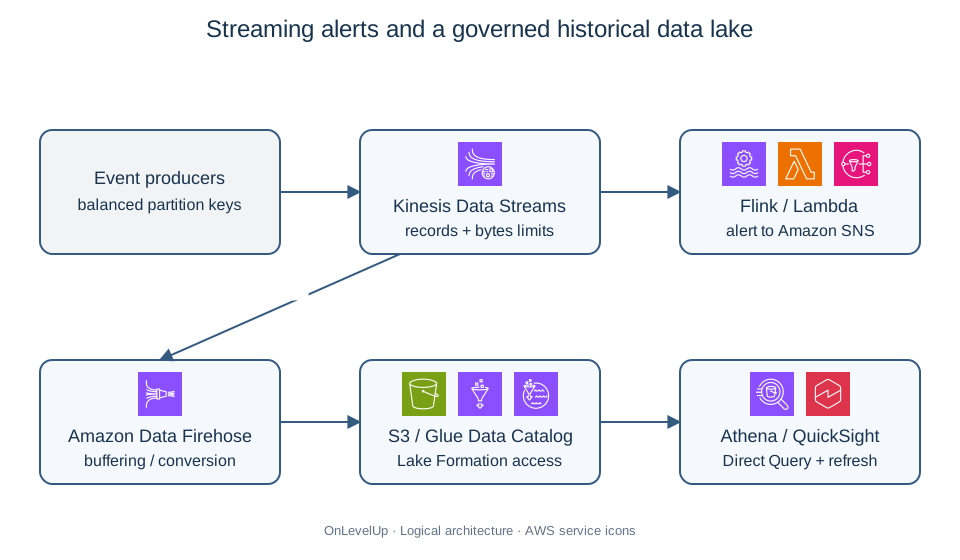
1. Ingestion patterns: batch, micro-batch, and streaming
Start with how fresh the data must be.
| Pattern | Freshness | Typical services | Example |
|---|---|---|---|
| Batch | Hours to days |  DataSync,  Glue ETL,  EMR,  Transfer Family, eligible offline-transfer solutions |
Nightly export of sales files |
| Near real time (micro-batch) | Seconds to minutes |  Amazon Data Firehose,  S3 event notifications plus  Lambda |
Web logs delivered to S3 every 60 seconds |
| Real time (streaming) | Milliseconds to seconds |  Kinesis Data Streams,  Amazon MSK,  managed Apache Flink |
Fraud detection while a card is swiped |
| Change data capture | Continuous |  AWS DMS |
Replicating a database into a data lake |
The wrong choice is common in exam stems: using Kinesis Data Streams for a nightly file, or a nightly batch for a "within seconds" requirement.
2. Streaming services compared
2.1 Kinesis Data Streams (KDS)
KDS ingests ordered, replayable records for custom consumers.
- Shard capacity (provisioned mode): each shard accepts up to 1 MB/s or 1,000 records/s for writes and delivers 2 MB/s of shared reads (up to 5 read calls per second).
- Enhanced fan-out: each registered consumer gets a dedicated 2 MB/s per shard pushed over HTTP/2, which removes read contention between multiple consumers.
- Retention: 24 hours by default, configurable up to 365 days, so consumers can replay.
- Capacity modes: provisioned (you choose shard count and can split or merge shards) or on-demand (automatic scaling, with Standard and Advantage options). Configure warm throughput before predictable spikes and check Region/account limits; automatic scaling is not unlimited instantaneous capacity.
- Record size: up to 10 MiB per record after enabling large records; the default remains 1 MiB. Large records use burst capacity for intermittent traffic, not a higher sustained per-shard write rate. Check downstream payload limits and base64 overhead.
- Partition key determines the shard; a skewed key creates a hot shard and
ProvisionedThroughputExceededException.
Sizing example. 20,000 events per second at 2 KB each is 40 MB/s of writes and 20,000 records/s. The byte limit needs 40 shards and the record limit needs 20, so provision 40 shards (the larger result), plus headroom and even partition-key distribution. This simplified calculation uses the question’s decimal KB/MB units; include partition-key bytes and use consistent units in production.
2.2 Amazon Data Firehose
Firehose is a fully managed delivery service: no shards, no consumers to build. It buffers records (by size and time interval) and delivers to Amazon S3,  Amazon Redshift,
 Amazon OpenSearch Service, Splunk, HTTP endpoints, and Apache Iceberg tables. It can run a Lambda transformation and convert JSON to Parquet or ORC using a schema in the AWS Glue Data Catalog. Format conversion requires JSON input and an S3 destination; convert CSV to JSON first with Lambda, or use Glue for batch CSV-to-Parquet conversion. Delivery is near real time, with feature-dependent buffering. Firehose has no consumer replay API; a KDS source can provide upstream replay.
2.3 Amazon MSK and Managed Service for Apache Flink
Amazon MSK runs Apache Kafka. Choose it when the stem says the company already uses Kafka, needs Kafka APIs, or has Kafka tooling it wants to keep. Amazon Managed Service for Apache Flink runs stream processing applications (windowed aggregations, joins, anomaly detection) over KDS or MSK sources.
| Need | Choose |
|---|---|
| Custom real-time processing, replay, multiple consumers | Kinesis Data Streams |
| Load streaming data into S3/Redshift/OpenSearch with no code | Data Firehose |
| Existing Kafka applications, Kafka APIs | Amazon MSK |
| Sliding-window analytics, Flink SQL or other Flink applications on streams | Managed Service for Apache Flink |
| Decouple two services with simple message queueing |  SQS (not an analytics service) |
A frequent pattern is KDS → Firehose → S3, which combines custom consumers with managed delivery.
3. Data transfer services
| Service | Use for | Notes |
|---|---|---|
| AWS DataSync |
Online, scheduled or one-time transfer between on-premises (NFS, SMB, HDFS, object storage) and S3,  EFS,  FSx, or between AWS storage services |
Agent-based on premises; encrypts in transit, verifies integrity, handles metadata, bandwidth throttling; documented task ceilings are 10 Gbps with an agent and 5 Gbps without an agent, not guaranteed throughput |
 AWS Storage Gateway |
Ongoing hybrid access: on-premises apps using NFS/SMB (S3 File Gateway), iSCSI volumes (Volume Gateway), or virtual tapes (Tape Gateway) backed by AWS | Local cache for low latency; not a bulk migration tool |
| AWS Transfer Family |
SFTP, FTPS, FTP endpoints backed by S3 or EFS; AS2 uses S3 only | Managed servers, existing partner workflows unchanged |
AWS Snow family ( Snowball Edge) |
Legacy/existing-customer offline bulk transfer or edge compute | Closed to new customers since November 2025; for new projects evaluate DataSync, Data Transfer Terminal or partners |
| AWS DMS |
Database migration and continuous replication (CDC), including to S3 or  Kinesis |
Pair with SCT/schema conversion for heterogeneous engines |
| S3 Transfer Acceleration | Long-distance transfers between clients and an S3 bucket | Uses edge locations and the AWS backbone |
| S3 multipart upload | Large single objects | Parallel parts, resumable |
 Direct Connect / VPN |
The network path for any of the above | Direct Connect offers a dedicated connection; VPN throughput varies with the internet path, tunnel limits and configuration |
Transfer time arithmetic. Time = data size ÷ effective bandwidth. 80 TB over a dedicated 1 Gbps link at 80% utilization is 80 × 10¹² × 8 bits ÷ (0.8 × 10⁹ bits/s) = 800,000 seconds, about 9.3 days. If the deadline is two weeks and the link carries other traffic, an eligible existing-customer Snowball Edge shipment, a partner/terminal transfer or a faster link may be needed; a deadline of only a few days requires higher effective bandwidth or a verified offline alternative. DataSync or Direct Connect alone does not override this calculation. Always do the arithmetic when a stem gives sizes and a deadline.
Choosing DataSync versus Storage Gateway. DataSync moves data efficiently (migration, recurring copy, replication); Storage Gateway presents AWS storage to on-premises applications as a local file share, volume, or tape (extending, caching, backing up). "Copy an NFS share to S3 nightly" → DataSync. "Users on premises need a file share whose data lives in S3" → S3 File Gateway.
4. The data lake: S3, Glue,  Lake Formation,
 Athena
A data lake stores raw and curated data in open formats on Amazon S3 and layers catalog, governance, and query engines on top.
| Layer | Service | Role |
|---|---|---|
| Storage | Amazon S3 |
Durable, scalable raw, cleaned, and curated zones |
| Catalog | AWS Glue Data Catalog (crawlers) |
Central metadata: databases, tables, schemas, partitions |
| Transformation | AWS Glue ETL (serverless Spark),  Glue DataBrew (visual preparation), Amazon EMR |
Clean, join, convert formats |
| Governance | AWS Lake Formation |
Central permissions down to table, column, row, and cell level, cross-account sharing, tag-based access control |
| Query | Amazon Athena (serverless SQL), Amazon Redshift Spectrum, EMR |
Query data in place |
| Visualization |  Amazon QuickSight (now surfaced as part of Amazon Quick in the exam guide) |
Dashboards, SPICE in-memory engine |
4.1 AWS Glue
- Crawlers infer schema and partitions and register tables in the Data Catalog.
- Glue ETL jobs run serverless Apache Spark (or Python shell, Ray); you pay per DPU-hour, with no cluster to manage. Job bookmarks track processed data for incremental runs.
- Glue streaming ETL consumes Kinesis or Kafka.
- Triggers and workflows orchestrate multi-step pipelines;
 Step Functions or
 EventBridge can orchestrate across services.
4.2 Amazon Athena and file format
For Athena SQL on-demand, query charges depend on data scanned; capacity reservations and Spark use compute-based pricing. For scanned-data pricing, the main performance and cost levers are:
- Columnar formats (Parquet, ORC) instead of CSV or JSON: Athena reads only the columns referenced.
- Compression (Snappy, GZIP, ZSTD).
- Partitioning by commonly filtered keys (for example
year/month/dayorregion) so queries prune partitions. - Fewer, larger files (128 MB to 1 GB) instead of millions of tiny files.
Convert stored CSV with Glue, or JSON streams with Firehose format conversion. Column pruning, compression and partition pruning can substantially reduce scanned bytes; measure the saving for the actual schema and query filters rather than promising a fixed percentage. Use workgroups to enforce per-query scan limits and separate teams, and Athena federated queries to reach relational or other sources.
4.3 AWS Lake Formation
Lake Formation layers governance on top of S3 and the Glue Data Catalog. Instead of crafting S3 bucket policies and  IAM policies for every team, you register the S3 location and grant fine-grained permissions on tables, columns, rows, and cells, including LF-tags (attribute-based control) and cross-account sharing. Supported integrations and configurations of Athena SQL, Glue, EMR and Redshift Spectrum enforce those grants. Keep IAM permissions for service actions, KMS and query results appropriately restricted, and prevent broad direct S3 access from bypassing column filters. "Analysts must see the table but not the
ssn column" is a Lake Formation question.
5. Choosing processing compute
| Service | Best fit |
|---|---|
| AWS Glue |
Serverless ETL on a schedule or event; schema-aware; moderate to large Spark jobs |
| Amazon EMR (on EC2/EKS) |
Full control of Spark, Hive, Presto, HBase; custom libraries; very large or long-running jobs; can use Spot for task nodes |
| EMR Serverless |
Spark or Hive jobs without managing clusters, intermittent workloads |
| AWS Lambda |
Small, event-driven transformations, such as per-file validation; ordinary invocations have a 15-minute limit |
| Amazon Redshift |
Structured analytics warehouse with SQL, large joins, BI at scale |
| Managed Service for Apache Flink |
Continuous stream processing |
If the stem says "minimal operational overhead" and "serverless", prefer Glue (or EMR Serverless). If it says "existing Spark code with custom JARs and Hadoop ecosystem tools", prefer EMR.
6. Securing ingestion
Task 3.5 explicitly includes securing ingestion endpoints. Typical controls:
- IAM roles with temporary credentials for producers, with least privilege to a specific stream, delivery stream, or prefix.
- Encryption in transit (TLS on all service endpoints) and at rest (SSE-KMS on S3, KDS server-side encryption, Firehose encryption) with customer-managed
 KMS keys if required.
 VPC endpoints (interface endpoints for Kinesis, Firehose, Glue; gateway endpoint for S3) so producers in private subnets avoid the internet.
- Lake Formation for governed consumption and bucket policies that require TLS, plus S3 Block Public Access settings.
- Throttling and validation:
 API Gateway authentication and throttling (usage-plan quotas are best effort),
 WAF, schema validation in Firehose Lambda transformation, and a dead-letter location for bad records.
7. Worked example: clickstream analytics pipeline
Scenario. ShopStream's website emits about 5,000 click events per second (about 1 KB each, JSON). Marketing wants dashboards that are no more than 2 minutes behind. Data scientists want to query a year of history with SQL at low cost, and the legal team requires that analysts cannot see the email field. The team has no cluster administrators and wants as little operational work as possible.
Step 1: choose ingestion. Use Amazon Data Firehose for managed delivery, while treating the two-minute freshness target as an end-to-end objective to measure. Configure short buffering compatible with the chosen conversion/partitioning features; a 60-second setting alone is not a maximum latency guarantee. Dynamic partitioning can add buffering delay, so use a simpler delivery path if tests exceed the budget.
Step 2: transform on the way in. Configure record format conversion to Parquet using a table schema in the Glue Data Catalog, with dynamic partitioning by year/month/day, and write to a curated S3 prefix with Snappy compression.
Step 3: catalog and query. Declare the Glue table and use Athena partition projection with predictable date paths rather than waiting for a periodic crawler to discover each new partition. Athena then prunes the relevant files. Include query duration, retries and visibility of newly delivered objects in the freshness measurement.
Step 4: govern. Register the S3 location in Lake Formation and grant analysts SELECT on the table with the email column excluded. Give authorized data scientists full-table access separately. Restrict direct S3 access and the Athena query-results bucket so neither path exposes excluded values.
Step 5: visualize. Use QuickSight Direct Query, with explicit visual refresh and caching settings, not a scheduled SPICE refresh: the minimum incremental SPICE schedule is 15 minutes. Budget delivery, query and visual refresh together; re-querying when opening a dashboard is not automatic continuous freshness. If the validated end-to-end path cannot stay within two minutes, keep S3/Athena for history and add a suitable streaming serving path for the live dashboard, or renegotiate the objective. Do not claim a hard two-minute SLA from these service choices alone.
Step 6: secure. The producers use IAM roles and an interface VPC endpoint for Firehose; the bucket uses SSE-KMS and requires TLS.
Why other answers are worse. Kinesis Data Streams could use Lambda or managed Flink consumers without a server fleet, but adds consumer and stream configuration that this delivery-only requirement does not need. A nightly Glue job from raw JSON would miss the 2-minute target. Storing CSV and having analysts scan it from Athena would scan more bytes when queries need only selected columns; benchmark the actual cost difference. Controlling the email field with S3 bucket policies cannot filter columns; use governed query permissions such as Lake Formation or remove sensitive fields before storage.
8. Comparison: which service solves which problem
| Requirement | Answer | Why not the alternative |
|---|---|---|
| Stream to S3 with no code, minutes of delay | Data Firehose | KDS needs consumers |
| Multiple consumers, replay for 7 days | Kinesis Data Streams | Firehose has no replay |
| Existing Kafka producers and consumers | Amazon MSK | KDS has a different API |
| Convert CSV to Parquet on a schedule, serverless | Glue ETL | EMR needs cluster management |
| Ad hoc SQL on S3, pay per query | Athena | Redshift needs a cluster or serverless workgroup |
| Column-level permissions in the lake | Lake Formation | S3 policies cannot filter columns |
| Migrate 300 TB with a 1 Gbps link and short deadline | Data Transfer Terminal/partner, or Snowball Edge only for eligible existing customers | Compare transfer plus preparation, shipping and validation time; do not assume device eligibility |
| Recurring NFS-to-S3 copy | DataSync | Storage Gateway is for hybrid access |
| On-premises file share backed by S3 | S3 File Gateway | DataSync does not present a share |
| Partners upload through SFTP into S3 | Transfer Family | Self-managed SFTP servers |
| Replicate a database continuously into S3 | DMS with CDC | DataSync copies files, not database changes |
9. Common pitfalls
- Choosing Kinesis Data Streams when Firehose meets a "load into S3" requirement with less management.
- Choosing Firehose when the stem needs replay, multiple consumers, or sub-second latency.
- Forgetting a hot shard: low-cardinality partition keys throttle producers.
- Querying CSV or JSON in Athena with no partitioning, scanning the full data set.
- Using S3 bucket policies to hide columns; this is Lake Formation's role.
- Using Storage Gateway as a bulk migration tool, or DataSync as a file share.
- Ignoring transfer arithmetic: online transfer of hundreds of terabytes over a modest link misses the deadline.
- Running a persistent EMR cluster for a job that runs 30 minutes a day.
- Producing millions of tiny S3 objects, which slows Athena, Glue, and EMR.
- Treating SQS as an analytics or streaming service.
10. Exam tips
- "Real-time, custom consumers, replay" → Kinesis Data Streams; "load streaming data into S3/Redshift/OpenSearch" → Firehose.
- "Kafka" → MSK.
- "Convert to Parquet to reduce query cost" → Glue for CSV, or Firehose format conversion for JSON input to S3, plus partitioning.
- "Serverless SQL on S3" → Athena.
- "Fine-grained (column/row) permissions on a data lake" → Lake Formation.
- "Move NFS/SMB data to AWS on a schedule" → DataSync; "on-premises access to S3 data" → Storage Gateway.
- "SFTP" → Transfer Family.
- "Petabytes or poor bandwidth" → compare verified online capacity, Data Transfer Terminal and partners; Snowball Edge requires existing-customer eligibility.
- "Dashboards" → QuickSight.
- "Existing Spark/Hadoop code" → EMR; "intermittent Spark" → EMR Serverless or Glue.
11. Mini case study (with solution)
Scenario. TransitMetrics collects ticket-validation events from 12,000 bus validators (about 3,000 events per second, 500 bytes each) and also has a historical archive of 120 TB of CSV files in an on-premises NFS storage system connected by a 2 Gbps internet link. Operations needs an alert within 5 seconds when a validator reports tampering. The data team needs the full history plus the live events in a queryable lake, with SQL access for analysts and strict hiding of the cardId column. Two municipal partners send daily CSV files over SFTP.
Questions. Design the ingestion and transformation architecture.
Solution.
- Live events and alerts: send events to Kinesis Data Streams (3,000 records/s × 500 B = 1.5 MB/s, so provision at least 3 shards: max(ceil(1.5 MB/s / 1 MB/s), ceil(3,000 records/s / 1,000 records/s)) = 3, before headroom and partition-key skew; alternatively use on-demand). A Managed Service for Apache Flink application or a Lambda consumer detects tampering and publishes to SNS. Measure producer, consumer and notification latency against the five-second objective; these service choices alone do not guarantee it. A Firehose delivery stream reading from the same stream converts to Parquet, partitions by date, and writes to S3. Because both a custom consumer and a delivery path are required, KDS is the right entry point, not Firehose alone.
- Historical archive: 120 TB over 2 Gbps at about 80% utilization is 120 × 10¹² × 8 ÷ (1.6 × 10⁹) = 600,000 s, about 6.9 days before preparation and verification. Compare that duration with the actual deadline; use DataSync over the existing link (or Direct Connect if the internet link is shared), with bandwidth throttling during business hours. If the link were unavailable or the deadline were a few days, evaluate Data Transfer Terminal or a qualified offline-transfer partner; Snowball Edge is an option only for eligible existing customers.
- Partner files: AWS Transfer Family SFTP endpoint writing to an S3 landing bucket; an S3 event triggers a Glue job (or EventBridge-scheduled workflow) to validate and convert the CSV to Parquet.
- Catalog and governance: Glue Data Catalog plus Lake Formation with column-level exclusion of
cardIdfor analysts. - Query and visualization: Athena for SQL, QuickSight for dashboards.
Why not alternatives. Firehose alone cannot run the tamper detection with a custom consumer, though it can serve as one branch. Storage Gateway would extend the NFS share but not efficiently migrate 120 TB. A self-managed SFTP server on  EC2 adds administration that Transfer Family removes. A permanent EMR cluster for the Parquet conversion wastes capacity compared with serverless Glue.
12. Glossary
- Shard: unit of capacity in a Kinesis data stream.
- Enhanced fan-out: dedicated per-consumer throughput on a Kinesis shard.
- Firehose buffer: size and time thresholds before Firehose delivers a batch.
- Data Catalog: Glue's central metadata repository.
- Crawler: Glue component that infers schemas and registers tables.
- Partition pruning: skipping data directories that do not match a query filter.
- Parquet / ORC: columnar file formats for analytics.
- LF-tag: Lake Formation attribute used for tag-based access control.
- DataSync: managed online data transfer service.
- Storage Gateway: hybrid service presenting AWS storage to on-premises systems.
- CDC: change data capture, continuous replication of database changes.
- SPICE: QuickSight's in-memory calculation engine.
13. Summary checklist
- I can match batch, near-real-time, and real-time requirements to the right ingestion service.
- I can size Kinesis shards from MB/s and records/s and explain enhanced fan-out and retention.
- I can choose between KDS, Firehose, MSK, and Flink.
- I can choose between DataSync, Storage Gateway, Transfer Family, Snow family, and DMS, and do transfer-time arithmetic.
- I can design an S3 + Glue + Athena + Lake Formation data lake with Parquet and partitions.
- I can choose Glue, EMR, EMR Serverless, or Lambda for transformation.
- I can secure ingestion with IAM, KMS, TLS, and VPC endpoints.
For destination performance and access protocols, review object, file, block and hybrid storage.
Sources
-
Firehose format conversion: https://docs.aws.amazon.com/firehose/latest/dev/record-format-conversion.html (opens in a new tab)
-
DataSync quotas and modes: https://docs.aws.amazon.com/datasync/latest/userguide/datasync-limits.html (opens in a new tab)
-
Transfer Family AS2 capabilities: https://docs.aws.amazon.com/transfer/latest/userguide/create-b2b-server.html (opens in a new tab)
-
Athena pricing modes: https://aws.amazon.com/athena/pricing/ (opens in a new tab)
-
Lake Formation and Athena permissions: https://docs.aws.amazon.com/athena/latest/ug/lf-athena-user-permissions.html (opens in a new tab)
-
EMR Serverless pre-initialized capacity: https://docs.aws.amazon.com/emr/latest/EMR-Serverless-UserGuide/pre-init-capacity.html (opens in a new tab)
-
Lambda timeout variants: https://docs.aws.amazon.com/lambda/latest/dg/gettingstarted-limits.html (opens in a new tab)
-
Kinesis shard limits (checked 2026-10-23): https://docs.aws.amazon.com/streams/latest/dev/service-sizes-and-limits.html (opens in a new tab)
-
Kinesis large-record configuration (checked 2026-10-23): https://docs.aws.amazon.com/streams/latest/dev/large-records.html (opens in a new tab)
-
SPICE refresh intervals (checked 2026-10-23): https://docs.aws.amazon.com/quicksight/latest/APIReference/API_RefreshFrequency.html (opens in a new tab)
-
Athena partition projection (checked 2026-10-23): https://docs.aws.amazon.com/athena/latest/ug/partition-projection.html (opens in a new tab)
-
Snow availability (checked 2026-10-23): https://aws.amazon.com/blogs/storage/aws-snow-device-updates/ (opens in a new tab)
-
AWS Certified Solutions Architect - Associate exam guide (SAA-C03), Domain 3, Task 3.5: https://docs.aws.amazon.com/aws-certification/latest/solutions-architect-associate-03/solutions-architect-associate-03-domain3.html (opens in a new tab)
-
SAA-C03 appendix, in-scope AWS services and features: https://docs.aws.amazon.com/aws-certification/latest/solutions-architect-associate-03/saa-technologies-concepts.html (opens in a new tab)
-
Amazon Kinesis Data Streams now supports 10x larger record sizes: https://aws.amazon.com/blogs/big-data/amazon-kinesis-data-streams-now-supports-10x-larger-record-sizes-simplifying-real-time-data-processing/ (opens in a new tab)
-
Big data analytics options on AWS, Amazon Kinesis: https://docs.aws.amazon.com/whitepapers/latest/big-data-analytics-options/amazon-kinesis.html (opens in a new tab)
-
AWS Glue FAQs: https://aws.amazon.com/glue/faqs/ (opens in a new tab)
-
Guidance for data lakes on AWS: https://docs.aws.amazon.com/solutions/data-lakes-on-aws/ (opens in a new tab)
-
AWS Architecture Icons (service icons): https://aws.amazon.com/architecture/icons/ (opens in a new tab)