
AWS KMS Encryption, Data Governance, and S3 Protection
Where this lesson fits
AWS KMS encryption and S3 data protection combine permissions, TLS, recovery, and retention. This SAA-C03 lesson covers Task 1.3: Determine appropriate data security controls within Domain 1: Design Secure Architectures (30% of scored content). You will select key controls, protect data in transit and at rest, and verify retention and recovery.
Learning objectives
After this lesson you will be able to:
- Distinguish AWS owned keys, AWS managed keys and customer managed keys in AWS Key Management Service (AWS KMS), and write a key policy that scopes who can use a key.
- Explain envelope encryption and why KMS never encrypts large data directly.
- Apply the right at-rest encryption option to Amazon S3, Amazon EBS, Amazon RDS, Amazon DynamoDB and Amazon EFS.
- Enforce encryption in transit with TLS and manage certificates with AWS Certificate Manager (ACM).
- Choose between AWS Backup, snapshots, versioning, replication and Object Lock to meet recovery and retention requirements.
- Select governance tools (Macie, Config, CloudTrail) that prove or enforce compliance.
Architecture map
1. The shape of a data protection answer
Separate three requirements:
| Question to ask | Typical answer family |
|---|---|
| Is the data protected at rest? Who controls the key? |  KMS (AWS managed or customer managed key),  CloudHSM for dedicated hardware |
| Is the data protected in transit? | TLS everywhere,  ACM certificates, aws:SecureTransport conditions |
| Can the data be recovered, retained and proven unaltered? |  AWS Backup, snapshots, versioning, replication, Object Lock, Vault Lock,  CloudTrail log validation |
Shared responsibility: managed does not mean responsibility-free
AWS protects managed infrastructure; customers configure classification, permissions, exposure, and available data controls.
| Control | EC2 database you operate | Managed RDS database | S3 objects |
|---|---|---|---|
| Hardware and underlying infrastructure | AWS | AWS | AWS |
| Guest OS and database patching | Customer | AWS operates patching; customer chooses supported versions and maintenance settings | AWS operates the service |
| Data access, IAM and application security | Customer | Customer | Customer |
| Recovery, retention and encryption choices | Customer configures and tests backups/keys | Customer configures retention, recovery tests and key access | Customer configures policies, versioning, lifecycle and key access |
Example. Moving PostgreSQL from EC2 to RDS removes host patching work. The customer still schedules supported maintenance, restricts access, and tests restores. Managed disks do not prevent an authorized database user from deleting records.
Check: an exposing S3 bucket policy remains the customer’s responsibility; hardware certification does not grant or restrict access.
2. AWS Key Management Service (AWS KMS)
KMS manages cryptographic keys and integrates with AWS services. CloudTrail provides customer-visible KMS API auditing for customer managed and AWS managed keys, not AWS owned keys. Check event exclusions; KMS logs do not record every object read.
2.1 Key types
| Key type | Who manages it | Visible in your account? | Rotation | Cost | Typical use |
|---|---|---|---|---|---|
| AWS owned key | AWS, shared across accounts | No | Managed by AWS | Free | Default encryption of some services (for example DynamoDB tables by default) |
AWS managed key (aws/s3, aws/ebs, ...) |
AWS, created on your behalf | Yes, but you cannot edit its policy | Automatic, yearly | Free for the key, you pay per request | Simple encryption with an audit trail |
| Customer managed key (CMK) | You | Yes, full control | Optional automatic rotation (every 365 days by default, configurable) or on demand | Monthly fee per key plus requests | Cross-account sharing, custom policies, key deletion control, compliance |
Key exam facts:
- A customer managed key is required when you need to share an encrypted resource with another account (for example an encrypted EBS or RDS snapshot), because you cannot edit the key policy of an AWS managed key to grant another account access.
- KMS keys are Regional: address the key’s regional endpoint, even from a client elsewhere. Related multi-Region keys share key ID and material, but retain regional policies and grants; managed integrations may treat them independently.
- A KMS key can be symmetric (AES-256-GCM, the default and the only type supported by most integrated services) or asymmetric (RSA or elliptic curve, for signing or for encryption outside AWS). There are also HMAC keys.
- You cannot delete a KMS key immediately. You schedule deletion with a waiting period of 7 to 30 days; you can disable a key as a reversible control. Do not assume this instantly revokes already-cached data keys or every running service operation.
- Rotation eligibility: automatic rotation applies to eligible KMS-generated symmetric keys; imported symmetric encryption keys support on-demand rotation after importing new material, not automatic rotation. Custom-store/asymmetric/HMAC keys need their own supported rotation procedure.
- Key material origin: KMS-generated (default), imported (bring your own key material), or a custom key store backed by AWS CloudHSM for customers that must hold keys in single-tenant hardware they control.
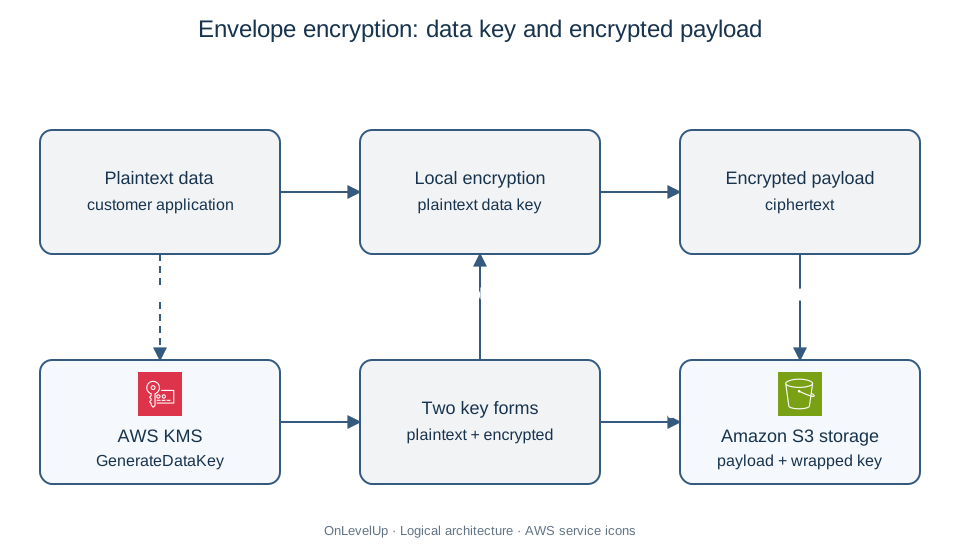
2.2 Envelope encryption
The KMS Encrypt operation accepts up to 4,096 bytes with a symmetric encryption key; asymmetric limits depend on key type and algorithm and can be smaller. Large payloads use envelope encryption:
- The service asks KMS for a data key (
GenerateDataKey). KMS returns a plaintext copy and a copy encrypted under the KMS key. - The service encrypts the data locally with the plaintext data key, then discards the plaintext key from memory.
- The encrypted data key is stored next to the ciphertext.
- To decrypt, the service sends the encrypted data key to KMS (
Decrypt), receives the plaintext data key, and decrypts the data locally.
Large payloads stay outside KMS. Reading SSE-KMS objects also requires authorized kms:Decrypt to unwrap their data keys.
2.3 Key policies,  IAM policies and grants
Every KMS key requires a key policy. KMS evaluates it with IAM policies, grants, and applicable restrictions. Same-account allow paths include:
- the key policy allows it directly, or
- the key policy contains the statement that enables IAM policies (the principal
arn:aws:iam::111122223333:rootwithkms:*), and an IAM policy then allows it; or a suitable grant authorizes the operation. Explicit denies and other applicable restrictions can still prevent access. Review AWS IAM and cross-account authorization alongside the key policy.
For cross-account use, both sides authorize access: the owning key policy and the caller account’s IAM policy.
{
  "Sid": "AllowAppRoleToUseTheKey",
  "Effect": "Allow",
  "Principal": { "AWS": "arn:aws:iam::111122223333:role/orders-app" },
  "Action": ["kms:Decrypt", "kms:GenerateDataKey"],
  "Resource": "*",
  "Condition": {
    "StringEquals": { "kms:ViaService": "s3.eu-west-1.amazonaws.com" }
  }
}
Here, kms:ViaService restricts this allow statement to S3; another policy or grant might still permit direct use. Key-policy Resource: "*" means the attached key. Grants permit specified operations on one key, often for service integration, and remain until retired or revoked.
Separate key administrators from key users; permission to manage keys need not grant decrypt access.
3. Encryption at rest by service
| Service | How encryption at rest works | Facts the exam likes |
|---|---|---|
 Amazon S3 |
Since January 2023, new object uploads receive automatic encryption, with SSE-S3 as the baseline unless another supported configuration is selected. Options: SSE-KMS, DSSE-KMS (dual-layer), SSE-C where enabled (customer-provided key supplied for applicable object requests), or client-side encryption | SSE-KMS gives key usage audit and policy control; S3 Bucket Keys can reduce SSE-KMS request cost by up to 99%; policies can enforce an approved key |
 Amazon EBS |
Encryption with KMS, transparent to the instance. Data at rest, snapshots, data moving between instance and volume are encrypted | Account-level default encryption per Region can force all new volumes to be encrypted. You cannot encrypt an existing volume in place: create a snapshot, copy it with encryption enabled, create a volume from the copy |
 Amazon RDS /  Aurora |
KMS encryption of storage, backups, snapshots and read replicas | No in-place encryption toggle for an existing unencrypted DB instance. Use an encrypted snapshot-copy restore, or supported RDS blue/green deployment to an encrypted green environment after checking engine and configuration limits |
 Amazon DynamoDB |
Always encrypted at rest. Choose AWS owned key (default), AWS managed key or customer managed key | Global tables encrypt each replica with its regional key configuration; related multi-Region KMS keys do not eliminate regional policy and service configuration |
 Amazon EFS |
Encryption at rest chosen at file system creation with KMS; encryption in transit with the EFS mount helper (TLS) | Cannot enable at-rest encryption later; migrate data to a new encrypted file system with  AWS DataSync |
 Amazon Redshift,  OpenSearch,  SQS, SNS |
KMS integration, usually a single setting | SQS offers SSE-SQS (free, managed) and SSE-KMS |
SSE-C is disabled by default for new general-purpose buckets under the documented April 2026 rollout; verify regional exceptions and existing-bucket settings.
3.1 Enforcing encryption with policies
Turning encryption on is not enough: you must prevent unencrypted data. Typical guardrails:
- An S3 bucket policy can require explicit
aws:kmsupload headers and an approved key ARN. A strict header requirement rejects a request without the header even when bucket default encryption would otherwise apply. Choose deliberately between default encryption and mandatory caller-specified headers. - A bucket policy with a
Denywhenaws:SecureTransportisfalse, so only HTTPS requests are accepted. - An SCP (from the previous lessons) that denies
ec2:CreateVolumewhenec2:Encryptedisfalse.  AWS Config managed rules such as
encrypted-volumes,rds-storage-encryptedands3-bucket-server-side-encryption-enabledto detect drift, with automatic remediation through Systems Manager Automation.
3.2 AWS CloudHSM
CloudHSM provides dedicated, single-tenant HSMs under customer key control. hsm2m.medium is FIPS 140-3 Level 3 certified; older hsm1.medium uses FIPS 140-2. Verify the required generation. Choose CloudHSM for dedicated-hardware requirements or supported PKCS#11, JCE, and CNG integrations. Otherwise, managed KMS usually reduces operations; a CloudHSM-backed custom key store combines them.
4. Encryption in transit
- TLS protects data between clients and AWS endpoints and between your tiers. All AWS API endpoints support HTTPS.
- Terminate TLS at an
 Application Load Balancer (HTTPS listener with an ACM certificate, with a redirect from HTTP to HTTPS), at
 Amazon CloudFront (viewer protocol policy "Redirect HTTP to HTTPS" or "HTTPS only"), or at
 API Gateway. For end-to-end encryption, re-encrypt from the load balancer to the targets. A Network Load Balancer can pass TLS through unchanged (TCP listener) or terminate it (TLS listener).
- For databases, enforce TLS on the connection: for example the
rds.force_sslparameter for PostgreSQL, orrequire_secure_transportfor MySQL. - For private networks,
 Site-to-Site VPN (IPsec) encrypts traffic over the internet, whereas
 Direct Connect is private but not encrypted by default (run a VPN over it, or use MACsec on supported dedicated connections).
4.1 AWS Certificate Manager (ACM)
ACM provisions, deploys and renews TLS certificates.
- Non-exportable public certificates issued by ACM have no additional certificate charge when used with integrated services (ALB, NLB, CloudFront, API Gateway,
 App Runner and others).
- Renewal is automatic when the certificate is in use and domain validation still succeeds. DNS validation with a CNAME record (easy with
 Route 53) is preferred over email validation because it renews without human action.
- Certificates are Regional, except that certificates for CloudFront must be requested in us-east-1 (N. Virginia). An ALB in
eu-central-1needs a certificate ineu-central-1. - For your own
 EC2/NGINX or on-premises server, use a charged exportable ACM public certificate or another provider. Non-exportable certificates cannot be installed there. Automate deployment after renewal and protect the exported key.
 AWS Private CA serves private PKI.
- Imported certificates are not renewed automatically; ACM only warns you before they expire.
5. Data protection, recovery and retention
Choose recovery and retention separately:
| Need | Service / feature | Notes |
|---|---|---|
| Central, policy-based backups across services and accounts | AWS Backup |
Backup plans and rules, schedule, lifecycle to cold storage, retention, cross-Region and cross-account copy, supports EBS, RDS, DynamoDB, EFS,  FSx, S3 and more |
| Make backups immutable (WORM) | AWS Backup Vault Lock | Compliance mode cannot be removed after the cooling-off period, even by the root user |
| Protect against accidental overwrite or delete in S3 | S3 Versioning (+ MFA Delete) | Deleting adds a delete marker; older versions are recoverable. Versioning cannot be disabled once enabled, only suspended |
| Prevent deletion for a fixed period (regulatory WORM) | S3 Object Lock | Governance mode: privileged users with a specific permission can override. Compliance mode: no user, including root, can delete or overwrite the protected version during retention. New versions and delete markers can still be created. Legal hold has no expiry until an authorized user removes it. Requires versioning |
| Archive vault with immutable policy |  S3 Glacier Vault Lock |
A lockable vault policy, such as "no deletes for 7 years" |
| Copy data to another Region or account | S3 Replication (CRR/SRR) | Needs versioning on source and destination; replicates only new objects unless you use S3 Batch Replication; Replication Time Control adds a 15-minute service commitment with conditions; distinguish design targets from SLA credit thresholds |
| Database point-in-time recovery | RDS automated backups (retention 1 to 35 days), DynamoDB PITR (configurable 1–35 days; default 35) | Restoring creates a new database/table |
| Automatic expiry | S3 Lifecycle, DynamoDB TTL | Lifecycle expires or transitions objects by age |
| Tamper-evident audit trail | CloudTrail log file validation, S3 Object Lock on the log bucket | Validate delivered logs against signed digest files; enabling digest delivery alone is not the validation step |
5.1 Discovering and classifying sensitive data
 Amazon Macie scans S3 using machine learning and pattern matching to find sensitive data such as personally identifiable information (PII) and credentials, and reports bucket exposure (public, unencrypted, shared).
- AWS Config records configuration changes and evaluates them against rules.
 Amazon GuardDuty detects threats (for example unusual S3 access).
 AWS Security Hub aggregates findings. IAM Access Analyzer finds resources shared outside your zone of trust.
- S3 Block Public Access at account or bucket level stops accidental public exposure, and S3 Access Points simplify policies for shared datasets.
6. Worked example: sharing an encrypted database with a partner account
Scenario. Northwind’s RDS PostgreSQL uses aws/rds. A subsidiary account needs an encrypted copy of last night’s snapshot to restore in eu-west-1.
Step 1: Identify the blocker. An aws/rds-encrypted snapshot cannot be shared. Its AWS managed key policy cannot be changed to authorize the subsidiary.
Step 2: Create a customer managed key in the source account, alias/northwind-shared-db, with a key policy that lets the subsidiary account (999988887777) use kms:Decrypt, kms:DescribeKey, kms:CreateGrant and kms:ReEncrypt*.
Step 3: Re-encrypt the snapshot. Copy the snapshot in the source account and choose the new customer managed key as the target key. The copy is encrypted under the shared key.
Step 4: Share the copied snapshot with the subsidiary account ID (modify snapshot attributes). Do not make it public.
Step 5: In the subsidiary account, an IAM policy allows the DBA role to use the key, then the DBA copies the shared encrypted snapshot into their account using a permitted destination key and restores from that copy. A shared encrypted DB snapshot cannot be restored directly.
Alternatives: CSV export does not preserve the snapshot restore path. Encrypted snapshots cannot be public. Neither editing an AWS managed key policy nor adding IAM permission alone solves cross-account key access.
7. Another worked example: forcing HTTPS and KMS on a bucket
A compliance rule says: "Files in the claims-docs bucket must be encrypted with a key whose use we can audit, and must never be transferred over plain HTTP."
- Create a customer managed key and make it the bucket default encryption (SSE-KMS) with a Bucket Key to reduce request costs.
- Add a bucket policy statement
Denywith"Condition": {"Bool": {"aws:SecureTransport": "false"}}for all principals. - If callers must explicitly request encryption, require the
aws:kmsheader and approved KMS key ARN through suitable policy conditions. Test uploads with absent headers, a wrong algorithm, and a wrong key. Otherwise, design the policy to permit the approved bucket default; do not unintentionally deny that intended path. - Give the application role
s3:GetObject,s3:PutObject, pluskms:GenerateDataKeyandkms:Decrypton the key. Without the KMS permissions the role would getAccessDenied. - Turn on S3 Block Public Access and the required CloudTrail S3 data events, and use Macie for supported sensitive-data discovery. Bucket Keys reduce KMS calls and use the bucket ARN in KMS encryption context, so review context-based policies and do not expect one KMS event per object access.
For transport controls, combine this design with AWS VPC security and private connectivity. For recovery targets and cutover planning, continue with Multi-AZ architecture and disaster recovery.
8. Common pitfalls
- Believing that S3 default encryption is "off". New objects are always encrypted; the real question is which key (SSE-S3, SSE-KMS, ...).
- Forgetting that RDS, EFS and EBS volumes cannot be encrypted in place; the migration path is snapshot, encrypted copy, restore (EBS, RDS) or a new file system and DataSync (EFS).
- Using an AWS managed key when cross-account sharing is required.
- Confusing disable (instant, reversible) with schedule deletion (7 to 30 days, then permanent and data becomes unrecoverable).
- Requesting the ACM certificate for CloudFront outside us-east-1.
- Assuming Direct Connect encrypts. It does not by default.
- Choosing S3 Object Lock governance mode when the question says "no one, including the root user".
- Forgetting that S3 replication and Object Lock require versioning.
- Recommending CloudHSM when the question does not demand dedicated hardware; KMS is simpler and cheaper.
9. Exam tips
- "Least operational overhead" with encryption: pick AWS managed keys or SSE-S3/SSE-KMS defaults, not CloudHSM or client-side encryption.
- "Audit who used the key" or "control rotation and policy": customer managed key with CloudTrail.
- "Prevent deletion even by administrators" for a fixed period: Object Lock compliance retention on each version, or an appropriate immutable backup/vault policy with its own lock state and scope.
- "Detect PII in S3": Macie. "Check that volumes are encrypted continuously": AWS Config rule.
- "Reduce KMS costs for a high-volume S3 workload": S3 Bucket Keys.
- "Disaster recovery across Regions with encrypted data": multi-Region keys or re-encryption during replication (S3 replication can re-encrypt SSE-KMS objects with a destination key).
10. Mini case study (with solution)
Scenario. MediCore Labs stores laboratory reports in Amazon S3 (eu-west-1), keeps patient metadata in Amazon DynamoDB and runs a reporting database on Amazon RDS for MySQL. Requirements from the compliance office:
- All data encrypted at rest with keys the company controls and can rotate; usage must be auditable.
- Reports must not be deletable or alterable for 6 years, even by administrators.
- A copy of the reports must exist in
eu-central-1within about 15 minutes of upload. - The reporting RDS database was created without encryption last year and must now be encrypted with minimal downtime.
- Public traffic to the web portal must use HTTPS with certificates that renew automatically. The portal is served by CloudFront.
Solution.
- Create customer managed keys (one per data classification) with automatic rotation; use SSE-KMS with Bucket Keys on S3 and choose the customer managed key for DynamoDB. Verify KMS audit collection and S3 data-event coverage; Bucket Keys intentionally reduce KMS API events.
- Enable S3 Versioning and Object Lock in compliance mode with a 6-year default retention. Compliance retention protects the retained versions from deletion or overwrite by any user, including root; new versions or delete markers do not erase the retained versions.
- Enable S3 Cross-Region Replication with Replication Time Control to
eu-central-1, with a KMS key in the destination Region (or a multi-Region key), and grant the replication role access to both keys. - Evaluate supported RDS blue/green encryption first, checking engine and integration limits. Otherwise, migrate to an encrypted target with a consistent snapshot/full-load starting point and DMS CDC or supported native replication. Capture later writes, monitor lag, briefly stop writes, drain replication, validate data and application behavior, then switch clients. Plan recovery before target writes begin; switching back without reconciling them can lose data. DMS is not an RDS native read replica.
- Request a public certificate in ACM in us-east-1 (required for CloudFront), use DNS validation through Route 53 and set the viewer protocol policy to redirect HTTP to HTTPS.
Alternatives: governance retention can be bypassed. RTC’s 99.99% design target differs from the SLA credit threshold below 99.9%; monitor late/failed objects and check exclusions. Existing RDS encryption has no in-place toggle. CloudFront cannot use an eu-west-1 certificate.
11. Glossary
- AWS KMS: managed service for creating and controlling cryptographic keys.
- Customer managed key: a KMS key you create and whose policy and rotation you control.
- Envelope encryption: encrypting data with a data key that is itself encrypted under a KMS key.
- Key policy: the resource policy attached to a KMS key; mandatory.
- Multi-Region key: a set of interoperable KMS keys in different Regions with the same key material.
- SSE-S3 / SSE-KMS / SSE-C: server-side encryption with S3-managed, KMS-managed or customer-provided keys.
- CloudHSM: dedicated hardware security modules controlled by the customer.
- ACM: AWS Certificate Manager, issues and renews TLS certificates.
- Object Lock: S3 write-once-read-many protection with governance or compliance retention.
- Backup Vault Lock: immutability for AWS Backup recovery points.
- Macie: service discovering sensitive data in S3.
- Replication Time Control (RTC): monitored live replication with a 15-minute service commitment and an SLA-defined monthly credit threshold.
12. Summary checklist
- I can compare AWS owned, AWS managed and customer managed KMS keys and know when sharing needs a customer managed key.
- I can explain envelope encryption, the symmetric 4,096-byte direct limit, and algorithm-specific asymmetric limits.
- I know the snapshot/copy/new-resource paths for existing EBS/RDS data, the supported RDS blue/green option, and EFS migration to a new encrypted file system.
- I can enforce HTTPS and encryption using bucket policies, SCPs and Config rules.
- I distinguish non-exportable ACM certificates from charged exportable certificates and their deployment responsibilities; I know DNS validation and the CloudFront
us-east-1requirement. - I can pick between versioning, replication, Object Lock (governance or compliance), Backup Vault Lock and Glacier Vault Lock.
- I know when to use Macie, Config, CloudTrail validation and Access Analyzer.
Sources
-
KMS key types and audit visibility: https://docs.aws.amazon.com/kms/latest/developerguide/concepts.html (opens in a new tab)
-
KMS Encrypt payload limits: https://docs.aws.amazon.com/kms/latest/APIReference/API_Encrypt.html (opens in a new tab)
-
KMS authorization and grants: https://docs.aws.amazon.com/kms/latest/developerguide/policy-evaluation.html (opens in a new tab)
-
RDS encryption and blue/green options: https://docs.aws.amazon.com/AmazonRDS/latest/UserGuide/Overview.Encryption.html (opens in a new tab)
-
RDS snapshot sharing: https://docs.aws.amazon.com/AmazonRDS/latest/UserGuide/USER_ShareSnapshot.html (opens in a new tab)
-
S3 Bucket Keys and audit changes: https://docs.aws.amazon.com/AmazonS3/latest/userguide/bucket-key.html (opens in a new tab)
-
Object Lock version scope: https://docs.aws.amazon.com/AmazonS3/latest/userguide/object-lock.html (opens in a new tab)
-
S3 RTC SLA: https://aws.amazon.com/s3/sla-rtc/ (opens in a new tab)
-
ACM exportable certificates: https://docs.aws.amazon.com/acm/latest/userguide/acm-exportable-certificates.html (opens in a new tab)
-
CloudHSM certification: https://docs.aws.amazon.com/cloudhsm/latest/userguide/fips-validation.html (opens in a new tab)
-
Imported symmetric KMS material and on-demand rotation: https://docs.aws.amazon.com/kms/latest/developerguide/importing-keys-considerations.html (opens in a new tab)
-
Shared responsibility model (checked 2026-10-23): https://aws.amazon.com/compliance/shared-responsibility-model/ (opens in a new tab)
-
DMS change data capture (checked 2026-10-23): https://docs.aws.amazon.com/dms/latest/userguide/CHAP_Task.CDC.html (opens in a new tab)
-
Multi-Region KMS keys (checked 2026-10-23): https://docs.aws.amazon.com/kms/latest/developerguide/multi-region-keys-overview.html (opens in a new tab)
-
AWS Certified Solutions Architect - Associate exam guide (SAA-C03), Domain 1, Task 1.3: https://docs.aws.amazon.com/aws-certification/latest/solutions-architect-associate-03/solutions-architect-associate-03.html (opens in a new tab)
-
AWS Certified Solutions Architect - Associate: https://aws.amazon.com/certification/certified-solutions-architect-associate/ (opens in a new tab)
-
AWS Architecture Icons (service icons): https://aws.amazon.com/architecture/icons/ (opens in a new tab)