
AWS IAM, Federation, and Multi-Account Access for SAA-C03
Practice scoring note. The official SAA-C03 uses a scaled score with a passing score of 720; this is not a raw 72% conversion. Its 65 questions include 50 scored and 15 unscored questions. Our 72% mock threshold and domain distribution across all 65 questions are teaching choices, not an official scoring replica or a guarantee of passing.
AWS IAM controls who can access cloud resources and which actions they can perform. This SAA-C03 lesson connects IAM policy evaluation, federation, temporary credentials, and multi-account guardrails to Task 1.1, Design secure access to AWS resources, in Domain 1 (30% of scored content).
Learning objectives
After this lesson you will be able to:
- Explain how AWS evaluates a request and predict whether it is allowed or denied.
- Choose between IAM users, IAM roles, IAM Identity Center and web identity federation for a given workforce or application scenario.
- Write and debug least-privilege identity-based policies, resource-based policies and permissions boundaries.
- Use AWS STS to grant temporary credentials, including cross-account access with
AssumeRoleand external IDs. - Design a multi-account strategy with AWS Organizations and service control policies (SCPs).
- Recognize the traps that SAA-C03 sets around "secure access" questions (Domain 1, Task 1.1, 30% of scored content for the whole domain).
Architecture map
1. The big picture: authentication, authorization, accounting
Every request to AWS is an API call, and every API call answers three questions:
- Who are you? (authentication: a principal such as an IAM user, an IAM role session, a federated user, or the account root user)
- What are you trying to do? (an action such as
s3:GetObjecton a resource such asarn:aws:s3:::reports-bucket/2026/*) - Are you allowed? (authorization: AWS evaluates all applicable policies)
Auditing ("what happened?") is handled by  AWS CloudTrail, which records management events by default for 90 days in Event history; a trail delivers them to
  Amazon S3 for long-term retention.
The exam tests mostly question 3, and the mental model is a short decision flow.
1.1 Policy evaluation logic
Evaluate the grant path and principal, not a universal sequence in which every policy must say Allow:
- An applicable explicit deny wins. Check organization guardrails where applicable; SCPs do not grant access and have exceptions such as the management account and service-linked roles.
- For an identity-policy grant, intersect its permissions with applicable permissions boundaries and session policies. Missing permission means implicit deny.
- For a same-account resource-policy grant, identify the principal: a direct grant to an IAM user ARN or role-session ARN is not restricted by an implicit deny in a boundary; a direct session grant is also not limited by an implicit deny in the session or identity policies. A grant to a role ARN remains limited by its boundary and session policies. Explicit denies still apply.
- For ordinary cross-account resource access, both the caller's identity permissions and the resource owner's policy must authorize it. Assuming a role changes the calling principal to a session in the destination account. Check service-specific rules, especially KMS key policies, separately.
Example: identity grant. A role allows S3 and EC2, but its boundary allows only S3: its identity policies cannot grant EC2.
Example: resource grant. In the same account, a bucket policy directly allowing a named role-session ARN to read one object can authorize that request despite an implicit omission in its session policy. An explicit Deny still blocks it. Do not generalize that exception to a grant naming the role ARN.
Default is deny; boundaries and SCPs restrict rather than grant. See the principal-specific evaluation rules (opens in a new tab) when debugging exceptions.
1.2 Policy types at a glance
| Policy type | Attached to | Grants permissions? | Typical use |
|---|---|---|---|
| Identity-based (managed or inline) | User, group, role | Yes | "This role can read this bucket" |
| Resource-based | S3 bucket,  SQS queue, SQS queue,  KMS key, KMS key,  Lambda function, role trust policy Lambda function, role trust policy |
Yes (can name principals, including other accounts) | Cross-account bucket access, allow  CloudFront or another service to call a resource CloudFront or another service to call a resource |
| Permissions boundary | User or role | No (sets maximum) | Let developers create roles, but cap what those roles can do |
| SCP | Organization root, OU, account | No (sets maximum) | Guardrails across many accounts |
| Session policy | A temporary session | No (sets maximum) | Narrow a role for one particular session |
| Resource control policies / RCPs | Organization, OU, account | No (sets maximum on resources) | Org-wide limits on who can access resources, for example block access from outside the organization |
2.  IAM fundamentals
2.1 The root user
Each AWS account has a root user (the e-mail address that created the account). Best practices that appear on the exam:
- Enable MFA on the root user and do not create access keys for it.
- Do not use root for daily work. Use it only for the few tasks that require it (consult the current root-only task list rather than assuming ordinary billing administration requires root).
- Use organization-controlled contact and recovery details rather than a single employee's personal details. Organizations with centralized root access can remove long-term root credentials from member accounts and perform supported privileged tasks centrally.
2.2 Users, groups, roles
| Identity | What it is | Credentials | Use when |
|---|---|---|---|
| IAM user | A long-term identity inside one account | Password and/or access keys (long-lived) | Rarely today: legacy applications that cannot use roles, break-glass users |
| IAM group | A collection of IAM users | None | Attach policies to many users at once (groups cannot be principals in a policy) |
| IAM role | An identity with permissions that anyone trusted can assume | Temporary credentials issued by STS |  EC2, Lambda, EC2, Lambda,  ECS tasks, cross-account access, federation ECS tasks, cross-account access, federation |
The exam strongly prefers roles with temporary credentials over access keys. If an option says "store access keys in the application configuration" or "embed keys in the AMI", it is almost certainly wrong. Applications running on AWS compute use an instance profile (EC2), an execution role (Lambda), or a task role (ECS), or a role associated with a Kubernetes service account through EKS Pod Identity or IRSA ( EKS) instead.
2.3 Least privilege in practice
Least privilege means granting only the actions on only the resources that are needed, under only the conditions that are needed. Tools that help:
- IAM Access Analyzer generates a policy from CloudTrail activity and also reports resources shared outside your zone of trust (external access findings) and unused access.
- Last accessed information shows which services and actions a role actually used, so you can remove the rest.
- Condition keys narrow policies:
aws:SourceIp,aws:MultiFactorAuthPresent,aws:PrincipalOrgID,aws:RequestedRegion,s3:prefix,aws:SourceVpce, and others. - Tags (ABAC): attribute-based access control compares principal tags with resource tags, so one policy scales to many teams.
Example identity policy that lets a role read objects only under its own team prefix and only over TLS:
{
  "Version": "2012-10-17",
  "Statement": [{
    "Effect": "Allow",
    "Action": ["s3:GetObject"],
    "Resource": "arn:aws:s3:::analytics-data/${aws:PrincipalTag/team}/*",
    "Condition": { "Bool": { "aws:SecureTransport": "true" } }
  }]
}
2.4 Permissions boundaries
A permissions boundary is a managed policy used as the maximum permissions for a user or role. For identity-policy grants, effective permissions are the intersection of the identity policy and the boundary; direct resource grants have the principal-specific exceptions above.
Real-world use: a platform team wants developers to create their own roles for Lambda functions without becoming administrators. The platform team grants iam:CreateRole and iam:AttachRolePolicy with a condition requiring a specific boundary (iam:PermissionsBoundary). Whatever identity policies a developer attaches, those grants cannot exceed the boundary; also control resource policies and direct session grants.
3. Temporary credentials with AWS STS
The AWS Security Token Service issues temporary security credentials (access key, secret key, session token) with an expiration time that depends on the API. AssumeRole accepts 15 minutes up to the role's configured maximum (at most 12 hours), with a default of one hour; role chaining is capped at one hour. GetFederationToken for an IAM user can issue sessions up to 36 hours, so the 12-hour ceiling is not universal across STS.
| STS API | Caller is | Typical scenario |
|---|---|---|
AssumeRole |
An IAM identity (or another role) | Cross-account access, privilege elevation, role chaining |
AssumeRoleWithSAML |
A user authenticated by a SAML 2.0 IdP | Enterprise single sign-on to the console or CLI |
AssumeRoleWithWebIdentity |
A user authenticated by an OIDC provider (Amazon Cognito, Google, and so on) | Mobile or web app users calling AWS services (prefer Amazon Cognito identity pools) |
GetSessionToken |
An IAM user | Force MFA for CLI calls by users |
GetFederationToken |
An IAM user | Legacy custom federation broker |
A role has two sides:
- Trust policy (a resource-based policy on the role): who may assume it.
- Permissions policies: what the session can do once assumed.
3.1 Cross-account access with a role
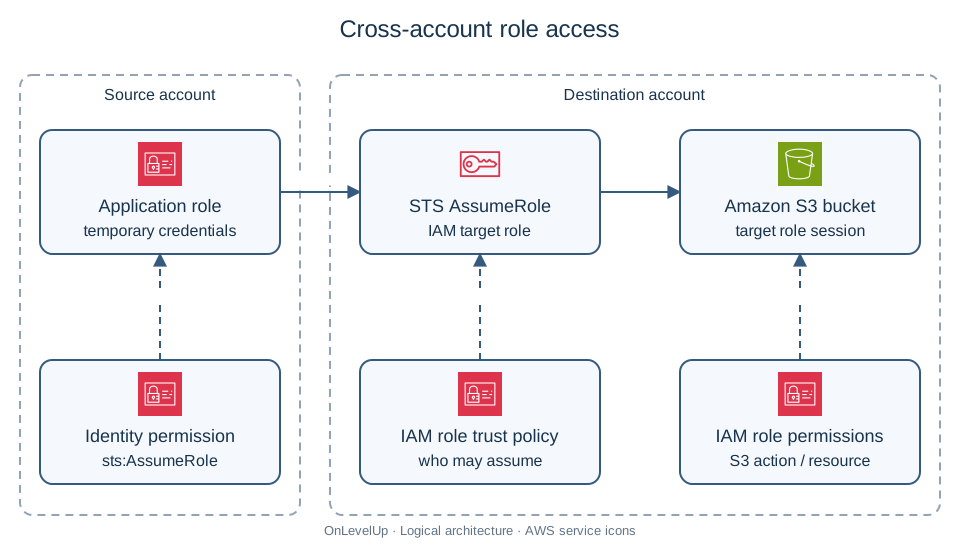
Scenario: a central account (111111111111) hosts a reporting application that must read an S3 bucket in a data account (222222222222).
Preferred pattern:
- In account 222222222222, create the role
ReportReaderwith permissions to read the bucket and a trust policy naming account 111111111111 (or, better, the exact role ARN of the application). - In account 111111111111, give the application's role permission to call
sts:AssumeRoleonarn:aws:iam::222222222222:role/ReportReader. - The application calls
AssumeRole, receives temporary credentials, and uses them for the S3 calls.
When a third-party SaaS vendor needs access to your account, add an external ID condition to the trust policy (sts:ExternalId). The vendor generates a unique value per customer and binds it to that customer's requests. AWS does not treat this value as secret: the protection comes from the trust relationship and correct customer binding, not obscurity. It prevents the "confused deputy" problem, where another customer tricks the vendor into accessing your role.
An alternative for S3 is a bucket policy that grants the other account's principal directly. This avoids assuming a role, but the caller keeps its own account's identity (so, for example, objects it writes are owned by it unless Object Ownership is set to bucket owner enforced).
4. Workforce identity: IAM Identity Center and federation
4.1 Choosing the right service
| Need | Best answer |
|---|---|
| Employees sign in once to many AWS accounts and cloud applications, using a corporate directory |  AWS IAM Identity Center (successor to AWS SSO) AWS IAM Identity Center (successor to AWS SSO) |
| Employees authenticate through an existing SAML 2.0 IdP and need a few roles in one account | IAM SAML identity provider plus roles |
| Customers sign in to your web or mobile app, and you need user pools, social login, MFA |  Amazon Cognito user pools Amazon Cognito user pools |
| Those app users also need to call AWS services directly (for example upload to S3) | Amazon Cognito identity pools (exchange tokens for temporary AWS credentials) |
| An on-premises Active Directory must be used by AWS workloads |  AWS Directory Service (AWS Managed Microsoft AD, AD Connector, or Simple AD for basic needs) AWS Directory Service (AWS Managed Microsoft AD, AD Connector, or Simple AD for basic needs) |
4.2 IAM Identity Center
IAM Identity Center is the recommended way to give a human workforce access to multiple AWS accounts:
- It connects to an identity source: its built-in directory, an external IdP (Okta, Microsoft Entra ID and others, through SAML 2.0 with SCIM provisioning), or Active Directory.
- You create permission sets (collections of policies) and assign users or groups to accounts with a permission set.
- Identity Center creates roles in each target account automatically. Users get short-lived credentials through the access portal, the console, or the AWS CLI (
aws sso login). - Session duration and attribute-based access control are managed centrally. With an external IdP, enforce MFA at that IdP; IAM Identity Center does not provide its own MFA challenge for externally authenticated users.
Why it beats per-account IAM users: no password or key sprawl, one place to disable a leaver, consistent permissions across dozens of accounts, and credentials expire on their own.
4.3 Federation for applications
For web or mobile app users, Amazon Cognito is the standard answer. User pools handle sign-up, sign-in and tokens (JWT). Identity pools map authenticated (and optionally guest) identities to IAM roles, with fine-grained policies using the identity ID (for example ${cognito-identity.amazonaws.com:sub} to restrict each user to their own S3 prefix).
For workloads running outside AWS (CI/CD systems, on-premises servers), prefer short-lived credentials too: OIDC federation for pipelines (GitHub Actions, for example, can assume a role through an OIDC provider) or IAM Roles Anywhere for servers with X.509 certificates, instead of long-lived access keys.
5.  Multi-account strategy with AWS Organizations
A single account for everything is rarely right. Separate accounts give blast-radius isolation, clearer billing, and tailored guardrails. AWS Organizations lets you:
- Create and group accounts into organizational units (OUs).
- Apply SCPs to the root, OUs or accounts.
- Use consolidated billing (one payer, volume discounts shared, Reserved Instance and Savings Plans sharing).
- Enable organization-wide services: CloudTrail organization trails,
 AWS Config aggregators,
  GuardDuty and
  Security Hub delegated administrators, and
  AWS RAM resource sharing.
 - Use
 AWS Control Tower for a pre-built multi-account landing zone with guardrails (controls) and an account factory.
A common layout: a Management account (billing and Organizations only), a Security OU (log archive and security tooling accounts), an Infrastructure OU (shared networking), Workloads OUs (Prod, Non-Prod), and a Sandbox OU.
5.1 Service control policies
SCPs set the maximum permissions for accounts in the organization. Key facts:
- They apply to all IAM users and roles in member accounts, including the root user of the member account, but not to the management account.
- They do not grant anything. An applicable SCP must permit the action, and a valid identity or resource grant must separately authorize it.
- They do not affect service-linked roles.
- Two strategies: deny list (keep
FullAWSAccessand add explicit denies; easier to maintain and the exam default) and allow list (removeFullAWSAccessand allow only specific services; more restrictive, more upkeep).
Typical guardrails: deny leaving the organization, deny disabling CloudTrail or GuardDuty, deny use of Regions outside an approved list, deny creating IAM users, require encryption on specific resources.
Example SCP that denies actions outside two approved Regions (with an exemption list for global services in a real deployment):
{
  "Version": "2012-10-17",
  "Statement": [{
    "Effect": "Deny",
    "NotAction": ["iam:*", "organizations:*", "route53:*", "cloudfront:*", "support:*"],
    "Resource": "*",
    "Condition": {
      "StringNotEquals": { "aws:RequestedRegion": ["eu-west-1", "eu-central-1"] }
    }
  }]
}
5.2 Sharing resources across accounts
- AWS Resource Access Manager (RAM) shares resources such as VPC subnets,
 Transit Gateways and
  Route 53 Resolver rules without duplicating them. Sharing can be restricted to your organization.
 - Resource policies (S3, SQS, SNS, KMS, Lambda,
 ECR) can name accounts, or use
 aws:PrincipalOrgIDto allow every account in the organization with one line. - Roles for actions that must run inside another account.
6. Comparison: which tool for which problem?
| Scenario | Correct approach | Common wrong answer |
|---|---|---|
EC2 application needs to read  DynamoDB DynamoDB |
IAM role (instance profile) | Access keys stored on the instance |
| 40 employees need console access to 12 accounts using Microsoft Entra ID | IAM Identity Center with external IdP and permission sets | Create an IAM user per person per account |
| Partner SaaS tool must scan your account | Cross-account role with external ID | Share an IAM user's access keys |
| Prevent anyone in dev accounts from using unapproved Regions | SCP with aws:RequestedRegion deny |
IAM policy in every account |
| Developers can create roles but not exceed a set of services | Permissions boundary enforced by condition | Give them AdministratorAccess and trust them |
| Mobile app users upload photos to their own S3 prefix | Cognito identity pool with policy variable | Embed an IAM user's keys in the app |
| Allow all accounts in the organization to read a shared bucket | Bucket policy with aws:PrincipalOrgID |
List every account ID, updated by hand |
| Require MFA for a supported IAM-user temporary-session workflow | Condition aws:MultiFactorAuthPresent (or aws:MultiFactorAuthAge); federated IdP sessions require an appropriate federation design |
A password policy |
7. Worked example, step by step
Problem. A company has three accounts: shared-services, prod, and dev. A Lambda function in dev must write build artifacts to an S3 bucket in shared-services. Security wants: no long-lived keys, access only to the artifacts/dev/ prefix, and no access from outside the organization.
Step 1: choose the mechanism. Lambda has an execution role. Cross-account S3 access can be solved either by a resource policy on the bucket or by assuming a role. Because both are acceptable, we use the simplest: a bucket policy plus the function's identity policy (both sides must allow across accounts).
Step 2: identity policy on the Lambda execution role in dev.
{
  "Effect": "Allow",
  "Action": "s3:PutObject",
  "Resource": "arn:aws:s3:::build-artifacts-shared/artifacts/dev/*"
}
Step 3: bucket policy in shared-services.
{
  "Effect": "Allow",
  "Principal": { "AWS": "arn:aws:iam::DEV_ACCOUNT_ID:role/build-uploader" },
  "Action": "s3:PutObject",
  "Resource": "arn:aws:s3:::build-artifacts-shared/artifacts/dev/*",
  "Condition": { "StringEquals": { "aws:PrincipalOrgID": "o-exampleorgid" } }
}
Step 4: add a guardrail. An SCP on the dev OU denies iam:CreateUser and iam:CreateAccessKey, which prevents principals governed by that SCP from creating IAM users or access keys. It does not revoke existing keys and does not cover the SCP exceptions.
Step 5: verify. Use the IAM policy simulator or Access Analyzer to confirm that PutObject to another prefix is denied and that an account outside the organization cannot write.
Why it works. The function uses temporary credentials from its role; the permission is limited by prefix on both sides; the organization condition blocks outsiders; and the SCP prevents those new key-creation actions for principals it governs.
8. Common pitfalls
- Treating SCPs as grants. An SCP that "allows S3" does nothing without an independent identity or resource-policy grant.
- Forgetting the management account is exempt from SCPs. Do not run workloads there.
- Using IAM users for applications on AWS. Roles are the answer.
- Confusing groups and roles. Groups collect users and cannot be assumed; roles are assumed and issue temporary credentials.
- Wildcard principals.
"Principal": "*"in a bucket policy without a restricting condition makes the bucket public. - Cross-account with one-sided permission. The caller's identity policy and the resource's policy must both allow, unless a role is assumed.
- Root user daily use. Always wrong.
- Choosing Cognito for workforce access or Identity Center for customers. Identity Center is for employees; Cognito is for application customers.
- Using
GetFederationTokenor SAML federation per account when Identity Center fits. For many accounts, Identity Center is simpler.
To connect identity permissions with network exposure, continue with VPC connectivity and application security for SAA-C03.
9. Exam tips
- Keywords "temporary credentials", "no long-term credentials", "short-lived" → IAM roles and STS.
- Keywords "multiple accounts", "single sign-on", "corporate directory" → IAM Identity Center.
- Keywords "mobile app users", "social sign-in" → Cognito.
- Keywords "organization-wide restriction", "prevent even administrators" → SCP.
- Keywords "third party", "confused deputy" → role with external ID.
- Keywords "least operational overhead" → managed, centralized services over custom scripts.
- When two answers look secure, pick the one that is centralized and automatic (Identity Center, SCP, PrincipalOrgID) rather than per-account and manual.
10. Mini case study (with solution)
Scenario. Northwind Retail has 25 AWS accounts in AWS Organizations. Employees authenticate with Microsoft Entra ID. Today each engineer has an IAM user in every account they need, with long-lived access keys. An audit finds three issues: leaked keys in a public repository, no consistent MFA, and developers launching resources in Regions where the company has no legal presence. Management wants a fix with the least ongoing administration, without blocking developers from creating the IAM roles their Lambda functions need.
Questions.
- How should workforce access be redesigned?
- How are unapproved Regions blocked?
- How can developers create roles safely?
Solution.
- Deploy IAM Identity Center connected to Microsoft Entra ID (SAML with SCIM). Create permission sets (for example
Developer,ReadOnly,Admin), assign Entra groups to accounts, enforce MFA at the IdP, and delete the IAM users and access keys. Credentials become short-lived and a leaver is disabled in one place. - Attach an SCP to the workloads OUs that denies all actions when
aws:RequestedRegionis outside the approved list (withNotActionfor global services). It applies to the IAM users and roles it governs, including the member account root user; service-linked roles are exempt. Region conditions limit the endpoint called, not every possible cross-Region effect. - Let developers create roles only if they attach a permissions boundary (enforced by a condition on
iam:CreateRole), so identity-policy grants remain within the approved services. Also prevent developers from removing or replacing that boundary or editing its policy, and review direct resource-policy grants.
Why the alternatives fail. Rotating keys more often still leaves long-lived keys. Per-account IAM policies cannot prevent a local administrator from removing them. A custom Lambda that disables unapproved Regions is more work than an SCP.
11. Glossary
- Principal: an entity that can make requests (user, role session, federated user, service, account).
- Identity-based policy: a policy attached to an IAM identity.
- Resource-based policy: a policy attached to a resource that names who can access it.
- Permissions boundary: a managed policy that sets the maximum permissions of a user or role.
- SCP: service control policy; sets the maximum permissions for accounts in an organization.
- STS: AWS Security Token Service; issues temporary credentials.
- Trust policy: the resource-based policy on a role that defines who can assume it.
- External ID: a customer-specific identifier checked by a trust policy to prevent the confused deputy problem; AWS does not consider it a secret.
- IAM Identity Center: the service for workforce single sign-on across AWS accounts and applications.
- Permission set: a template of policies assigned to users or groups for an account in IAM Identity Center.
- ABAC: attribute-based access control using tags.
- OU: organizational unit in AWS Organizations.
- Confused deputy: a privilege-escalation problem where a trusted service is tricked into acting for another party.
12. Summary
- AWS decides each request with an explicit-deny-first evaluation; the default is implicit deny.
- Prefer roles and temporary credentials to IAM users and access keys; applications on AWS use instance profiles, execution roles and task roles.
- Least privilege is achieved with scoped actions, resources and conditions, refined with Access Analyzer and last-accessed data.
- Permissions boundaries and SCPs only restrict; identity and resource policies grant.
- Cross-account access uses an assumable role (with an external ID for third parties) or both-sided resource and identity policies.
- IAM Identity Center is the standard for workforce access to many accounts; Cognito is for application end users.
- AWS Organizations with OUs, SCPs, RAM,
aws:PrincipalOrgIDand Control Tower give a scalable, governed multi-account design. - Secure the root user with MFA and do not use it for routine tasks.
Sources
-
STS AssumeRole duration and role chaining (opens in a new tab)
-
AWS root access and centralized management (opens in a new tab)
-
MFA configuration by Identity Center identity source (opens in a new tab)
-
IAM evaluation with resource policies (checked 2026-10-23): https://docs.aws.amazon.com/IAM/latest/UserGuide/reference_policies_evaluation-logic.html (opens in a new tab)
-
Boundaries and principal-specific exceptions (checked 2026-10-23): https://docs.aws.amazon.com/IAM/latest/UserGuide/access_policies_boundaries.html (opens in a new tab)
-
Third-party roles and External ID (checked 2026-10-23): https://docs.aws.amazon.com/IAM/latest/UserGuide/id_roles_common-scenarios_third-party.html (opens in a new tab)
-
AWS Certified Solutions Architect - Associate exam guide (SAA-C03), Domain 1: https://docs.aws.amazon.com/aws-certification/latest/solutions-architect-associate-03/solutions-architect-associate-03.html (opens in a new tab)
-
AWS Certified Solutions Architect - Associate: https://aws.amazon.com/certification/certified-solutions-architect-associate/ (opens in a new tab)
-
AWS Architecture Icons (service icons): https://aws.amazon.com/architecture/icons/ (opens in a new tab)