
AWS Storage Selection: S3, EBS, EFS, FSx, and Hybrid Storage
Where this lesson fits
This lesson covers Domain 3: Design High-Performing Architectures, Task 3.1: Determine high-performing and scalable storage solutions. Domain 3 is 24% of the scored content of SAA-C03, and storage is its first task statement. AWS storage selection starts with the access model, then performance and resilience constraints. Questions in this task describe an access pattern ("thousands of Linux instances need the same files", "a database needs 60,000 IOPS at sub-millisecond latency", "a media company uploads 200 GB files from Asia to a bucket in Ireland") and expect you to pick the storage service and its configuration that sustains the required throughput, IOPS, latency, and growth.
Cost is deliberately out of scope here: the cost-optimized view of the same services is storage tiers, lifecycle, and archival in Task 4.1. In this lesson you choose for performance and scale, then confirm the choice is not absurdly expensive.
Learning objectives
After this lesson you will be able to:
- Classify a workload as object, file, or block storage and justify the choice.
- Size Amazon EBS volumes by volume type, IOPS, and throughput, and recognize instance-level limits.
- Design Amazon S3 access patterns that scale: prefixes, multipart upload, byte-range fetches, Transfer Acceleration, and S3 Express One Zone.
- Choose between Amazon EFS, Amazon FSx (Windows File Server, Lustre, NetApp ONTAP, OpenZFS), and instance-local storage.
- Select hybrid options: AWS Storage Gateway, AWS DataSync, AWS Transfer Family, and the Snow family.
- Plan for capacity growth without a migration project.
Architecture map
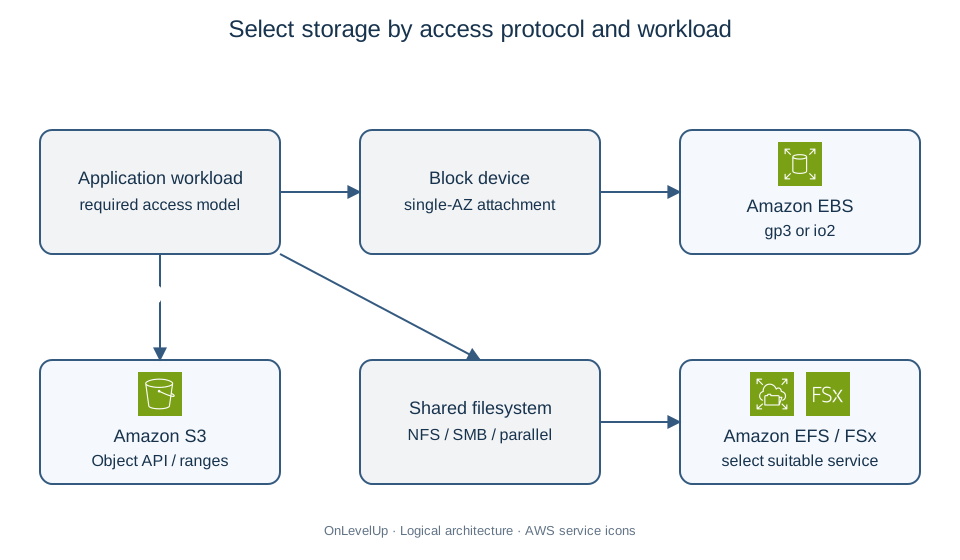
1. The three storage models
| Model | Interface | AWS services | Natural fit | Not for |
|---|---|---|---|---|
| Object | HTTP API (GET, PUT of whole objects) |
 Amazon S3, S3 Express One Zone,  S3 Glacier classes |
Media, backups, data lakes, static websites, logs | Workloads that need to modify bytes in place, or a POSIX filesystem |
| File | NFS (Linux) or SMB (Windows) |  Amazon EFS,  Amazon FSx family, S3 Files |
Shared content across many servers, lift-and-shift of filesystem apps, HPC scratch space | Single-instance boot volumes, ultra-low-latency block I/O |
| Block | Block device attached to one instance |  Amazon EBS,  EC2 instance store |
Boot volumes, self-managed databases, transactional workloads | Sharing the same device with many instances across AZs |
Two sentences decide most exam questions:
- "Shared by many instances" means file storage (EFS for Linux, FSx for Windows), never EBS — except the narrow io1/io2 Multi-Attach case (up to 16 Nitro-based instances in the same AZ, with a cluster-aware filesystem).
- "Modify part of a large file in place", "database files", "sub-millisecond latency" usually means block storage. General-purpose S3 object writes replace objects; Express One Zone supports append-only updates through a dedicated API, not arbitrary block overwrites. S3 Files supplies a separate file-system interface.
Remember also the durability and scope: S3 and EFS are Regional (data across at least three AZs, except S3 One Zone/Express One Zone and EFS One Zone), EBS is zonal, and instance store is ephemeral (it is lost on stop, hibernate, or host failure, and suitable NVMe families offer very high local IOPS with low latency; benchmark the instance and I/O pattern).
2. Amazon S3 at scale
2.1 Limits worth memorizing
- An object can be up to 50 TB (raised in December 2025). A single
PUTcarries at most 5 GB; use multipart upload from 100 MB (recommended) and necessarily above 5 GB. Upload parts in parallel, retry failed parts, and choose part sizes within the part-count and size limits. Complete or abort unfinished uploads to avoid ongoing part-storage charges. - Performance scales per prefix: at least 3,500
PUT/COPY/POST/DELETEand 5,500GET/HEADrequests per second per partitioned prefix, with no hard limit on the number of prefixes. Spreading keys over many prefixes (for example2026/10/07/sensor-42/...) multiplies throughput. - Strong consistency applies to successful object writes, overwrites, deletes and subsequent reads/lists. It does not make asynchronous cross-Region replication instantaneous, synchronize a file interface atomically with S3, or eliminate eventual propagation of bucket configuration changes.
2.2 Performance features and when to use them
| Requirement | Feature |
|---|---|
| Upload a 200 GB file reliably | Multipart upload with parallel parts |
| Users far from the bucket Region upload slowly | S3 Transfer Acceleration (enters the AWS network at a  CloudFront edge location) |
| Read only the header or a slice of a large object | Byte-range fetches (Range header), also parallelizable |
| Serve the same objects to millions of readers | Amazon CloudFront in front of the bucket (origin access control) |
| Single-digit-millisecond first-byte latency for hot data | S3 Express One Zone (directory buckets, one AZ, up to 10x faster than S3 Standard for request-intensive workloads) |
| Filter rows out of CSV/JSON/Parquet data |  Amazon Athena for SQL; S3 Select only for existing eligible customers (closed to new customers) |
| Mount a bucket as a filesystem | Mountpoint for Amazon S3 (sequential, high-throughput access), or Amazon S3 Files, announced in 2026, which provides file-system semantics over a linked versioned bucket with asynchronous synchronization; coordinate concurrent object/file writers |
| Analytics tables and vector search on S3 data | S3 Tables (managed Apache Iceberg) and S3 Vectors, recent additions on the exam's periphery |
Exam tip: Transfer Acceleration supports uploads and downloads through accelerated S3 endpoints. For repeated cacheable content read by distant users, evaluate CloudFront's edge cache; for transfers to/from a distant bucket without that cache, evaluate acceleration and its extra fee.
2.3 A worked sizing example for S3
A telemetry platform ingests 12,000 small objects per second. Keys look like device-logs/2026-10-07T18:00:00Z-<uuid>.json. Ingest fails intermittently with 503 Slow Down.
S3 automatically scales, but a sudden request-rate increase can return temporary 503 Slow Down while partitions adapt. Add exponential backoff, retry failed requests and monitor errors, including any KMS throttling. To parallelize this known write load, distribute keys over explicit prefixes such as device-logs/shard-00/... through shard-07/...: 12,000 / 8 = 1,500 writes/s per prefix, below the documented baseline. This is a sizing starting point, not an instantaneous throughput guarantee or a requirement to randomize every S3 key. A date-shaped key alone does not prove a bottleneck, and separate buckets are unnecessary.
3. Amazon EBS: sizing block storage
3.1 Volume types
| Type | Media | Max IOPS per volume | Max throughput per volume | Typical use |
|---|---|---|---|---|
| gp3 (general purpose SSD) | SSD | 80,000 | 2,000 MiB/s | Default choice: boot volumes, most databases; baseline 3,000 IOPS and 125 MiB/s independent of size; higher limits depend on size and IOPS/throughput ratios |
| gp2 (previous generation) | SSD | 16,000 | 250 MiB/s | Legacy; IOPS tied to size (3 IOPS per GiB), so capacity had to be over-provisioned for performance |
| io2 Block Express (provisioned IOPS SSD) | SSD | 256,000 | 4,000 MiB/s | Latency-sensitive, mission-critical databases (SAP HANA, Oracle); sub-millisecond latency, up to 64 TiB, Multi-Attach |
| io1 | SSD | 64,000 | 1,000 MiB/s | Previous-generation provisioned IOPS |
| st1 (throughput-optimized HDD) | HDD | 500 (large blocks) | 500 MiB/s | Big sequential scans: log processing, data warehouse,  EMR; cannot be a boot volume |
| sc1 (cold HDD) | HDD | 250 | 250 MiB/s | Infrequently accessed sequential data; cannot be a boot volume |
Key decision rules:
- Random, small-block I/O (databases, transactional apps) wants SSD; large sequential I/O (streaming reads of logs or data files) wants HDD and is measured in MB/s, not IOPS.
- With gp3, IOPS and throughput are provisioned separately from capacity. The classic exam scenario — "a gp2 volume was made 4 TiB only to reach 12,000 IOPS" — is solved by migrating to gp3 and provisioning the IOPS directly.
- Regional gp3 supports up to 80,000 IOPS and 2,000 MiB/s; the provisioned ratios and the EC2 instance limit still matter. Outposts gp3 retains 16,000 IOPS / 1,000 MiB/s limits. Choose io2 Block Express for its latency/durability characteristics or performance beyond gp3, not merely for exceeding the old 16,000-IOPS ceiling.
3.2 Instance-level ceilings
A volume cannot exceed what the instance can drive. Check whether the chosen instance is EBS-optimized, and verify its baseline/burst EBS bandwidth and IOPS. A common trap: an io2 volume provisioned at 64,000 IOPS attached to a small instance delivers only the instance's limit. If a question says the volume is provisioned correctly yet performance is capped, the answer is to use a larger instance size or an instance family with more EBS bandwidth.
On supported instances, Elastic Volumes let you increase size, change type, and adjust provisioned performance without detaching or restarting (then extend the partition/filesystem as needed), which is the usual answer to "capacity is running out and we cannot take an outage". The operation cannot shrink a volume: reclaiming excess capacity requires a smaller new volume and a planned data migration. EBS volume copies provide crash-consistent point-in-time copies in the same AZ; application-consistent copies require quiescing/flushing writes. They do not replace cross-AZ recovery snapshots.
3.3 Instance store
Instance store NVMe disks are physically attached to the host: hundreds of thousands to millions of IOPS and the lowest latency, but ephemeral. Use them for caches, scratch space, buffers, and replicated NoSQL nodes (Cassandra), always with data that can be rebuilt or that exists elsewhere. "Temporary scratch files needing maximum IOPS" is an instance store answer; "the database must survive a stop/start" is not.
4. Shared file storage
4.1 Amazon EFS
Amazon EFS is an elastic NFS filesystem with Regional or One Zone placement for Linux. It grows and shrinks automatically to petabytes, serves thousands of concurrent clients, and is reached through mount targets in each AZ (one per AZ, protected by a security group).
| Setting | Options | Guidance |
|---|---|---|
| Availability | Regional (multi-AZ) or One Zone | One Zone is cheaper but loses AZ resilience |
| Throughput mode | Elastic (default), Provisioned, Bursting | Elastic scales automatically with demand and is the safe default for spiky workloads; Provisioned pins a level when the workload is steady and high; Bursting ties throughput to stored data |
| Performance mode | General Purpose, Max I/O (legacy) | General Purpose gives the lowest per-operation latency and fits almost everything |
| Storage classes | Standard, Infrequent Access, Archive | Lifecycle management moves cold files automatically (cost topic, Chapter 11) |
EFS is the standard answer for "a shared document directory for an  Auto Scaling group across AZs", "a WordPress or CMS uploads folder", and "a Linux home directory shared by data scientists".
Performance depends on mode, Region, quotas and client: current Regional Elastic specifications list 20–60 GiB/s aggregate reads, while Provisioned lists 3–10 GiB/s. EFS is not universally limited below HPC throughput. Lustre is often preferred for parallel HPC access and direct S3 repository integration, rather than because every EFS configuration is too slow.
4.2 Amazon FSx
| FSx service | Protocol | Use it when the question says |
|---|---|---|
 FSx for Windows File Server |
SMB | Windows applications, Active Directory integration, NTFS ACLs, DFS namespaces |
 FSx for Lustre |
Lustre (POSIX) | HPC, machine learning, media rendering: hundreds of GB/s, sub-millisecond latency, and a link to an S3 bucket so objects appear as files (scratch for temporary, persistent for longer-lived) |
 FSx for NetApp ONTAP |
NFS, SMB, iSCSI | Multi-protocol access, snapshots/clones, existing NetApp estate and tooling |
 FSx for OpenZFS |
NFS | Moving ZFS workloads to AWS, snapshots, low-latency NFS |
Exam tip: "Windows + shared files" is FSx for Windows File Server, not EFS (which is NFS only). "Train a model over data already in S3 at very high throughput" is FSx for Lustre linked to the bucket.
5. Hybrid and migration paths
| Need | Service |
|---|---|
| On-premises servers must use AWS storage over standard protocols (NFS, SMB, iSCSI, VTL) with a local cache |  AWS Storage Gateway: S3 File Gateway, FSx File Gateway (existing customers only since October 2024), Volume Gateway (cached or stored), Tape Gateway |
| Copy or repeatedly synchronize large datasets between on premises and AWS, or between AWS services |  AWS DataSync (managed, parallel, with verification and scheduling) |
| Partners upload using supported Transfer Family protocols and storage backends |  AWS Transfer Family (SFTP/FTPS/FTP to S3 or EFS; check protocol, endpoint and identity-provider compatibility) |
| Offline transfer when network bandwidth is insufficient | Data Transfer Terminal or a qualified partner; Snowball Edge only for existing eligible customers (closed to new customers since November 7, 2025); Snowcone discontinued |
| Replace a tape library for compliance archives | Tape Gateway with S3 Glacier storage classes |
Rule of thumb: an existing application that must keep speaking NFS/SMB/iSCSI points to Storage Gateway; a one-off or scheduled data movement job points to DataSync.
6. Worked example: choosing storage for a mixed platform
Scenario. MeridianMed runs a medical-imaging platform on AWS:
- A PostgreSQL database on EC2 requires a sustained 30,000 IOPS at sub-millisecond latency on a 2 TiB volume.
- A fleet of 60 Linux instances in three AZs runs a viewer application that must read and write the same DICOM study folders.
- Radiology centres across the country upload 5 to 40 GB studies; uploads from the west coast to the bucket in
us-east-1are slow and sometimes fail. - A nightly GPU training job must read 8 TB of images already stored in S3 at more than 10 GB/s.
- The legacy on-premises PACS server can only write to an SMB share.
Step 1 — the database. 30,000 IOPS alone fits regional gp3, but the requirement for consistent sub-millisecond latency favors io2 Block Express. Provision the required IOPS and choose an instance with sufficient EBS IOPS and bandwidth; otherwise the instance becomes the bottleneck. The workload's latency and durability target, not an obsolete gp3 limit, decides the volume type.
Step 2 — the shared folders. 60 Linux instances across three AZs need concurrent read/write on a POSIX tree: Amazon EFS (Regional, Elastic throughput) with a mount target per AZ. EBS cannot be shared across AZs. The S3 object API is not a POSIX interface; S3 Files adds one with synchronization semantics that must be evaluated separately.
Step 3 — the uploads. Large files over long distances: multipart upload (resumable, parallel parts) combined with S3 Transfer Acceleration so the traffic enters the AWS backbone at a nearby edge location.
Step 4 — the training job. Data already lives in S3 and the job needs more than 10 GB/s: FSx for Lustre linked to the S3 bucket, using a supported Scratch 2 or persistent configuration and a data repository association. Size storage and throughput for the aggregate read target, then preload hot data or allow lazy loading; the first read still incurs S3 fetch latency. Export any outputs that must survive a scratch failure.
Step 5 — the legacy PACS. SMB on premises with cloud storage behind it: AWS Storage Gateway, S3 File Gateway (for a full Windows filesystem, evaluate FSx for Windows File Server over private connectivity; FSx File Gateway is closed to new customers), keeping a local cache for recently used studies.
Why other answers are worse. Striping gp3 volumes could reach 30,000 IOPS but adds RAID management and no latency guarantee. Mounting S3 with Mountpoint would not support the viewer's in-place writes. Manually copying the full dataset to each node adds staging work and duplicates data; Lustre provides a shared parallel namespace and configurable S3 import/export. Running a self-managed Samba server on EC2 to replace the gateway would add an unmanaged, non-resilient component.
7. Common pitfalls
- Choosing EBS for shared access across instances or AZs. Multi-Attach is io1/io2, same AZ, and needs a cluster filesystem.
- Forgetting the instance-level EBS ceiling when provisioning high IOPS.
- Using gp2 sizing logic (3 IOPS per GiB) when gp3 decouples IOPS from capacity.
- Putting random small-block database I/O on st1/sc1 HDD volumes, or trying to boot from them.
- Treating instance store as durable storage.
- Assuming Transfer Acceleration only uploads: it accelerates transfers to/from S3, whereas CloudFront provides reusable edge caching and distribution behavior.
- Using a single S3 prefix for a very high request rate and then blaming the service for
503 Slow Down. - Choosing EFS for Windows workloads (EFS is NFS; use FSx for Windows File Server) or EFS for a single-instance boot volume.
- Forgetting that EFS One Zone and S3 One Zone-IA / Express One Zone trade AZ resilience for price or latency.
- Picking DataSync when the application must keep speaking NFS/SMB continuously (that is Storage Gateway), or Storage Gateway for a one-time bulk migration (evaluate DataSync or a currently available offline transfer path).
8. Exam tips
- Map the stem to a model first: shared POSIX → EFS/FSx; attached block device → EBS; HTTP objects → S3.
- "Consistent sub-millisecond latency and high durability" → evaluate io2 Block Express. "Large sequential throughput, low cost" → st1.
- "No downtime while growing a volume" → Elastic Volumes.
- "Windows/SMB/Active Directory" → FSx for Windows File Server. "HPC/ML on data in S3" → FSx for Lustre.
- "Thousands of concurrent Linux clients, unpredictable growth" → EFS with Elastic throughput.
- "Objects larger than 5 GB" → multipart upload is mandatory.
- "Request-intensive, latency-sensitive, single-AZ acceptable" → S3 Express One Zone.
- "On-premises app must keep its NFS/SMB/iSCSI interface" → Storage Gateway with local cache.
9. Mini case study (with solution)
Scenario. NorthWind Analytics migrates a self-managed logging platform to AWS. Requirements:
- An ingest tier of 30 instances appends to a shared directory before batch processing; the directory holds 40 TB and grows 2 TB per month unpredictably.
- A nightly Spark job performs long sequential scans of a 10 TiB dataset on a single EC2 instance's attached volume; the job needs sustained 450 MiB/s and must not cost more than necessary.
- Raw logs must be retained as objects, queried occasionally with SQL, and read by partners through HTTPS.
- Historical logs are on an on-premises NAS and must be copied to AWS once, 60 TB total, over a 1 Gbps link shared with production traffic.
Questions. Choose a storage design for each requirement and justify it.
Solution.
- Shared ingest directory: Amazon EFS, Regional, Elastic throughput. It is POSIX, multi-AZ, shared by all 30 instances, and grows without capacity planning. A provisioned-throughput mode would require guessing the level; Elastic adapts.
- Spark scans: evaluate st1 for sequential I/O, but distinguish baseline from burst: st1 earns 40 MiB/s per TiB, so 10 TiB provides about 400 MiB/s baseline and can burst up to 500 MiB/s while credits last. For a sustained 450 MiB/s requirement, size for at least 11.25 TiB baseline or validate scan duration and BurstBalance; compare the extra capacity cost with gp3. Check instance EBS bandwidth too.
- Raw log retention: Amazon S3, with sufficient parallel prefixes for the measured request load, queried with Amazon Athena, and exposed to partners through presigned URLs or CloudFront rather than public access.
- One-time 60 TB migration: measure effective bandwidth and the deadline first. Use AWS DataSync online when feasible, or evaluate AWS Data Transfer Terminal or a qualified partner for offline transfer.
 Snowball Edge remains a legacy/existing-customer option, but new customers cannot order it since November 2025. At 80% of 1 Gbps, 60 TB takes about 6.9 days before validation; a shared link may take longer.
Why not alternatives. EBS cannot provide the shared cross-AZ file directory in requirement 1. For requirement 2, compare st1 capacity needed for baseline throughput with gp3 capacity plus provisioned-throughput charges; do not assume HDD is cheaper after sizing. Storing raw logs on EFS would be expensive and would not give the HTTP access of requirement 3. Storage Gateway for requirement 4 would still push 60 TB through the same saturated link.
10. Glossary
- Object storage: data stored as whole objects with metadata, addressed by key over HTTP.
- Block storage: a raw device the operating system formats and writes blocks to.
- File storage: a shared hierarchy accessed with NFS or SMB.
- IOPS: input/output operations per second, the metric for random small-block workloads.
- Throughput: MB/s, the metric for large sequential workloads.
- Prefix: leading characters of an S3 object key; parallel prefixes help distribute request load while S3 manages partitions.
- Multipart upload: splitting a large S3 upload into parts that upload in parallel and can be retried.
- Elastic Volumes: increasing EBS size or changing type/performance online on supported instances; no in-place shrinking.
- Multi-Attach: attaching one io1/io2 volume to up to 16 instances in the same AZ.
- Mount target: the EFS network endpoint in an AZ.
- Scratch vs persistent (FSx for Lustre): temporary high-performance storage versus durable, replicated storage.
- Storage Gateway: hybrid appliance exposing AWS storage through NFS, SMB, iSCSI, or VTL.
11. Summary checklist
- I can classify a workload as object, file, or block and name the matching service.
- I know the gp3, io2 Block Express, st1, and sc1 limits and when each applies.
- I remember that instance EBS bandwidth can cap a correctly provisioned volume.
- I can use Elastic Volumes, snapshots, and Multi-Attach correctly.
- I know the S3 object size limits, per-prefix request rates, multipart upload, byte-range fetches, and Transfer Acceleration.
- I can choose between EFS (and its throughput modes), FSx for Windows File Server, FSx for Lustre, ONTAP, and OpenZFS.
- I can pick Storage Gateway, DataSync, Transfer Family, or a currently available offline transfer option for hybrid/migration needs.
Combine performance decisions with AWS encryption, retention, and data protection. For end-to-end movement, compare data ingestion, transfer, and transformation services.
Sources
-
Verified 2026-10-26: https://docs.aws.amazon.com/ebs/latest/userguide/general-purpose.html (opens in a new tab)
-
Verified 2026-10-26: https://docs.aws.amazon.com/ebs/latest/userguide/provisioned-iops.html (opens in a new tab)
-
Verified 2026-10-26: https://docs.aws.amazon.com/ebs/latest/userguide/hdd-vols.html (opens in a new tab)
-
Verified 2026-10-26: https://docs.aws.amazon.com/ebs/latest/userguide/ebs-modify-volume.html (opens in a new tab)
-
Verified 2026-10-26: https://docs.aws.amazon.com/ebs/latest/userguide/ebs-volumes-multi.html (opens in a new tab)
-
Verified 2026-10-26: https://docs.aws.amazon.com/AmazonS3/latest/userguide/optimizing-performance.html (opens in a new tab)
-
Verified 2026-10-26: https://docs.aws.amazon.com/AmazonS3/latest/userguide/Welcome.html (opens in a new tab)
-
Verified 2026-10-26: https://docs.aws.amazon.com/AmazonS3/latest/userguide/mpuoverview.html (opens in a new tab)
-
Verified 2026-10-26: https://docs.aws.amazon.com/AmazonS3/latest/userguide/directory-buckets-objects-append.html (opens in a new tab)
-
Verified 2026-10-26: https://docs.aws.amazon.com/AmazonS3/latest/userguide/transfer-acceleration-examples.html (opens in a new tab)
-
Verified 2026-10-26: https://docs.aws.amazon.com/AmazonS3/latest/userguide/s3-files-synchronization.html (opens in a new tab)
-
Verified 2026-10-26: https://docs.aws.amazon.com/AmazonS3/latest/userguide/selecting-content-from-objects.html (opens in a new tab)
-
Verified 2026-10-26: https://docs.aws.amazon.com/efs/latest/ug/performance.html (opens in a new tab)
-
Verified 2026-10-26: https://docs.aws.amazon.com/fsx/latest/LustreGuide/create-dra-linked-data-repo.html (opens in a new tab)
-
Verified 2026-10-26: https://docs.aws.amazon.com/fsx/latest/LustreGuide/autoexport-data-repo-dra.html (opens in a new tab)
-
Verified 2026-10-26: https://docs.aws.amazon.com/filegateway/latest/filefsxw/DocumentHistory.html (opens in a new tab)
-
EBS gp3 regional and Outposts limits (checked 2026-10-23): https://docs.aws.amazon.com/ebs/latest/userguide/general-purpose.html (opens in a new tab)
-
S3 50 TB object limit (checked 2026-10-23): https://aws.amazon.com/about-aws/whats-new/2025/12/amazon-s3-maximum-object-size-50-tb/ (opens in a new tab)
-
S3 Transfer Acceleration directions (checked 2026-10-23): https://docs.aws.amazon.com/AmazonS3/latest/userguide/transfer-acceleration-examples.html (opens in a new tab)
-
S3 Select availability (checked 2026-10-23): https://docs.aws.amazon.com/AmazonS3/latest/userguide/selecting-content-from-objects.html (opens in a new tab)
-
FSx File Gateway history (checked 2026-10-23): https://docs.aws.amazon.com/filegateway/latest/filefsxw/DocumentHistory.html (opens in a new tab)
-
Snow device availability (checked 2026-10-23): https://aws.amazon.com/blogs/storage/aws-snow-device-updates/ (opens in a new tab)
-
AWS Certified Solutions Architect - Associate exam guide (SAA-C03), Domain 3, Task 3.1: https://docs.aws.amazon.com/aws-certification/latest/solutions-architect-associate-03/solutions-architect-associate-03.html (opens in a new tab)
-
SAA-C03 appendix, in-scope AWS services and features: https://docs.aws.amazon.com/aws-certification/latest/solutions-architect-associate-03/saa-technologies-concepts.html (opens in a new tab)
-
Amazon EBS volume types and features: https://aws.amazon.com/ebs/features/ (opens in a new tab)
-
Amazon S3 storage classes: https://aws.amazon.com/s3/storage-classes/ (opens in a new tab)
-
When to choose Amazon EFS: https://aws.amazon.com/efs/when-to-choose-efs/ (opens in a new tab)
-
Announcing Amazon S3 Files (2026): https://aws.amazon.com/about-aws/whats-new/2026/04/amazon-s3-files/ (opens in a new tab)
-
AWS Architecture Icons (service icons): https://aws.amazon.com/architecture/icons/ (opens in a new tab)